Today I want to show you a complete comparison between the Lasy AI, Ruyter's new app, and the Lovable, one of the most well-known tools in the universe Vibe Coding.
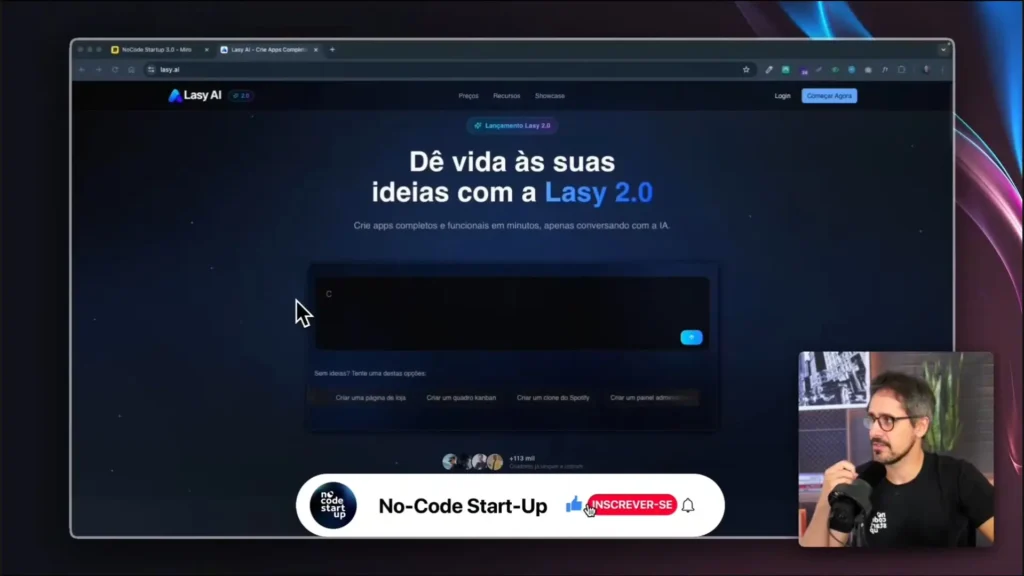
Lasy AI's proposal is bold: to allow anyone to create a website or application simply by describing what they want, with the help of... AI (Artificial Intelligence). The idea is promising.“But does it work as well as promised?“
Overview of the platforms
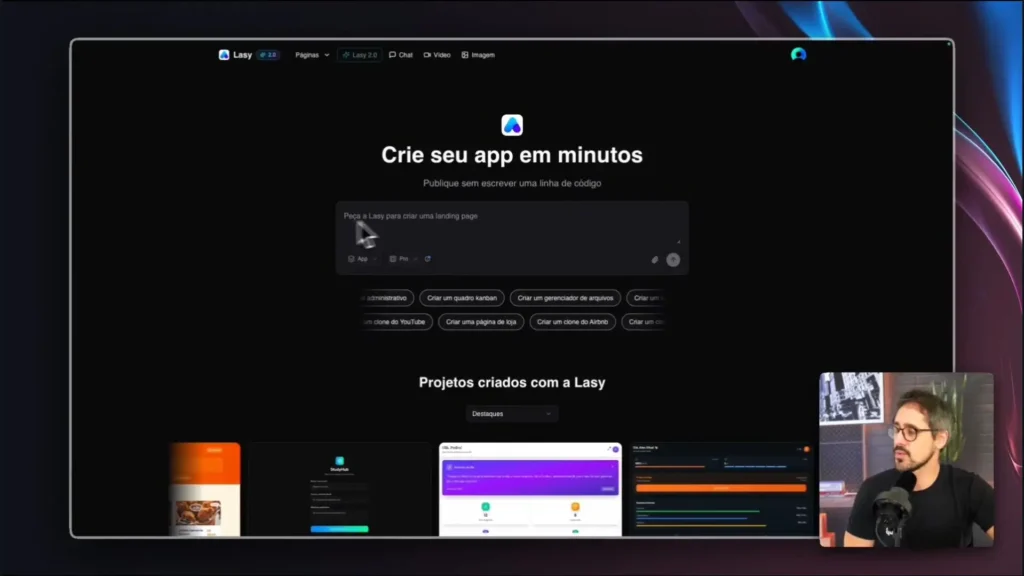
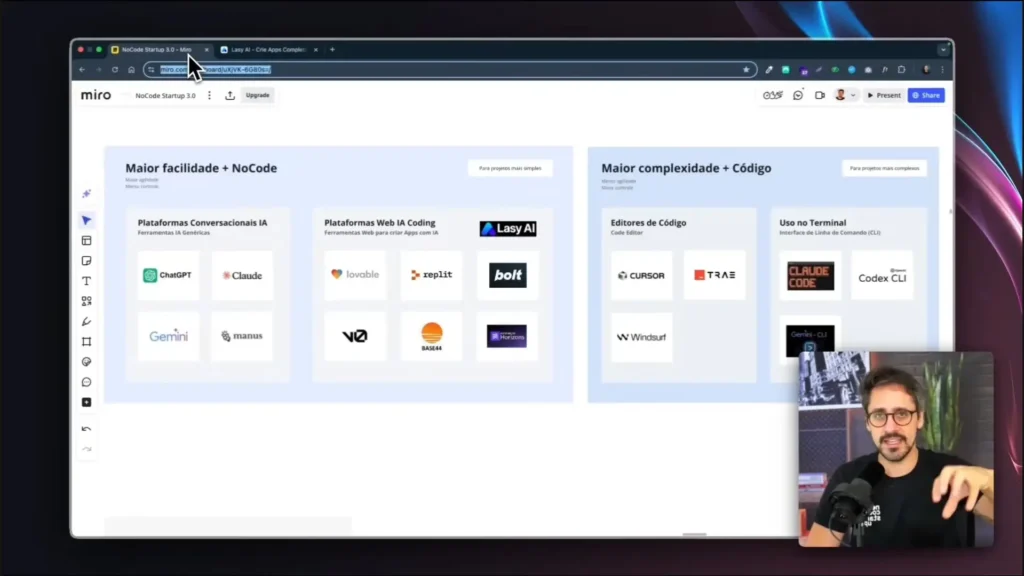
Right off the bat, I noticed that the platform follows the same line of tools as Lovable, Cursor, Bolt and ReplitYou describe the idea, send screenshots, and quickly have a functional prototype. The positive aspect is its practicality; the negative is the limited control over the code.
When it came time to test it, I opted for the plan. Pro (R$197), since the Starter does not allow integration with Supabase, It doesn't even remove the watermark. Another downside is that it doesn't offer a free version, which is a drawback for those who just want to try it out.
Even so, I went in, tested it, and paid to see what Lasy AI really delivers in practice.
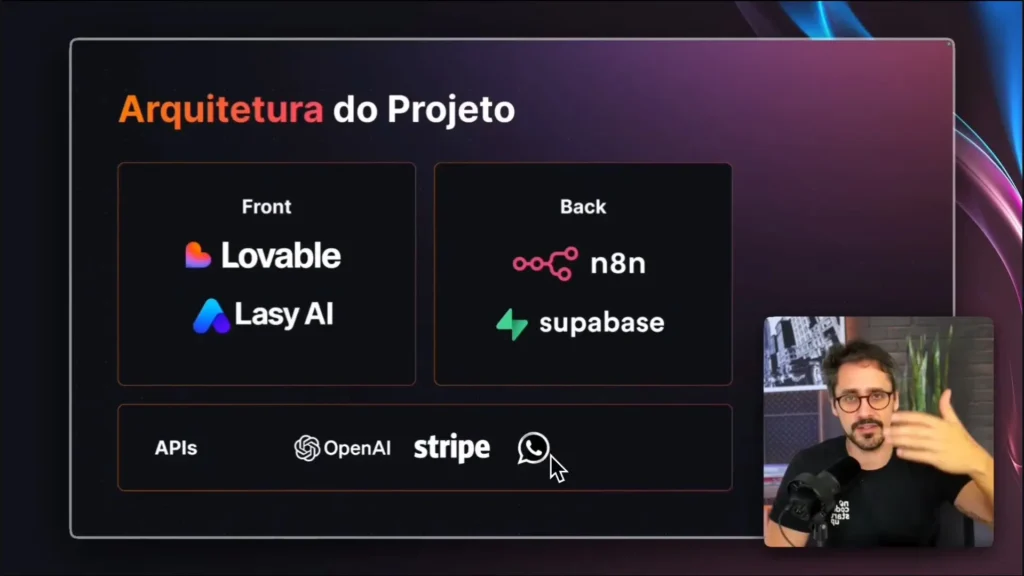
Creating an inventory management application (with Supabase)
After testing out the creation of a simple website, I decided to go further and create a... inventory management application cell phones, connecting with the Supabase, which is responsible for the database, authentication, and security aspects.
The idea was to assemble the same project on both platforms (Lasy AI and Lovable) using exactly the same prompt. Therefore, I could compare the results based on performance, design, and integration.
At Lovable, everything went very smoothly. In less than 5 minutes, the application was ready: control panel, product registration, editing and deletion, stable connection with Supabase, and a clean and functional layout. The system also allowed viewing average order value, total value, and graphs showing product distribution.
At Lasy AI, the scenario was completely different. The platform took more than 20 minutes to generate the project and presented several login errors and crashes. Even after redoing the flow and correctly configuring Supabase, the connection failed several times, and the login page even disappeared during the test.
These problems indicate that, while Lasy AI's proposal is good, its execution still needs to mature.
Practical tip: Whenever creating apps with AI, follow a structured methodology. prompting. I use the model. PRD Prompt, This process starts with identifying the problem, defines the solution, and details users and functionalities. This avoids frustration and improves results.
Practical results, drawbacks, and pitfalls to avoid.
After placing the two platforms side by side, it became clear: Lovable remains the most stable and reliable option for creating AI-powered projects..
THE Lasy AI It stood out positively in terms of price and credit usage, but failed in its integration with Supabase and user experience. The long loading times and constant errors made the process tedious.
Another trap I noticed is aggressive marketing. After payment, several pages appear... upsell, offering extra features and paid bonuses. This is common in digital marketing strategies, but it may sound excessive for those who are just looking to test the tool.
In the final comparison:
Price: Lasy AI is competitively priced, but there is no free trial.
Speed: Lovable created the app in 5 minutes; Lasy AI crashed after 40.
Integration: Lovable is fluid; Lasy AI requires manual key configuration.
Stability: Lovable ran without errors; Lasy AI was unstable.
In the end, the Lovable Keep going, especially for those who want to build complete apps systems and connect them with... Supabase, n8n or other tools without wasting time on technical glitches.
Many people believe that it's possible to become a millionaire with AI by creating apps in minutes, but the truth is that... This requires work, method, and business acumen..
AI today greatly facilitates development, but it alone does not build a successful business. Mastering marketing, content, finance, and market validation is also essential.
Another important point is the MVP (Minimum Viable Product). First, create a simple version of your idea, validate it with real users, and only then invest in something more complex. This avoids wasting time and energy.
The history of software development has always been marked by the relentless pursuit of efficiency. From the first simple text editors to robust Integrated Development Environments (IDEs), the goal has always been to reduce the programmer's cognitive load.
However, we are experiencing a tectonic shift in this scenario. The Cursor It emerges not just as another tool, but as the harbinger of a new era: that of editors. AI-Native.
Unlike traditional approaches that attempt to "graft" artificial intelligence onto legacy platforms, Cursor was designed from its source code to operate in symbiosis with Large Language Models (LLMs).
In this article, we will delve deeply into the technical and practical architecture of the Cursor, exploring how it allows the Visual Studio Code This article explores traditional methods and how you can use this tool to create complex softwares, even if your foundation is low-code or no-code.
The editor's cursor interface is in dark mode, displaying the AI-powered chat panel alongside the source code, demonstrating native integration.
What Does It Really Mean to Be an “AI-Native” Editor?
Many professionals still confuse the use of AI extensions with the use of a native environment. Until recently, the norm was to install plugins, such as... GitHub Copilot, within Visual Studio Code.
Although useful for completing lines (the famous inline completionThis model has a severe structural limitation: AI is a "tourist" in its editor. It doesn't "see" the whole picture.
Cursor breaks with this limitation through an architecture. AI-Native. Being a fork (an offshoot) of VS Code itself, it maintains the familiar interface that everyone loves, but rewrites the fundamental interactions.
This means that AI isn't just suggesting the next word; it has the permission and ability to read your project's structure, understand the context of multiple files simultaneously, and even predict where you'll click next.
This distinction is crucial for anyone wishing to work with AI Coding.
While older tools act as a glorified spell checker, Cursor acts as a senior engineer sitting next to you, capable of refactoring entire architectures because it understands the semantics of your project, not just the syntax of the open file.
To master the Cursor, it's necessary to go beyond the basics, something frequently discussed in... in-depth technical analyses about the tool.
The features that truly deliver exponential productivity gains — often referred to as "programming at the speed of thought" — reside in three main pillars: Tab, Composer, and Context-Aware Chat.
Let's dissect each one of them.
Cursor Tab: The Evolution of Autocomplete
Forget traditional autocomplete that only suggests variable names. The Cursor Tab It is powered by a custom model designed to predict. diffs (differences) integers.
As you type, the Cursor isn't just trying to guess the next word. It maintains an up-to-date representation of your code and suggests complex modifications that may span multiple lines.
The real magic happens in its ability to predict the cursor's location. If you've just edited a function and move your mouse to the test file, Cursor Tab will often already have the written test waiting only for your confirmation.
This drastically reduces the need for repetitive typing and manual navigation.
The Power of Composer Mode
If the Tab key is the evolution of writing, then... Composer It's the revolution in architecture. Accessed via the shortcut Ctrl+I (or Cmd+I), Composer allows you to write a prompt in natural language to edit multiple files simultaneously.
Imagine you need to modify a field in your application's database. In a standard editor, you would need to:
Change the bank's schema.
Update the API on the back-end.
Adjust the typing on the front-end.
Fix the user interface.
With Cursor Composer, you can simply type: “Add the 'phone' field to the users table, update the API to receive this data, and display the input in the registration form.‘ .
The editor will analyze the project dependencies, open all relevant files, and apply the changes in an orchestrated manner.
For our students AI Coding Training, This functionality is the "holy grail" that allows you to create complete SaaSs with technical knowledge focused on logic and architecture, delegating the syntax to AI.
Screenshot of the Cursor Composer feature showing a floating window editing multiple code files simultaneously (HTML, CSS, and JavaScript).
Chat and Global Context (@Codebase)
The biggest headache when using generic LLMs, such as ChatGPT in the browser, is the lack of context. You have to copy and paste code snippets incessantly.
Cursor solves this with local vector indexing.
When using the sidebar chat (Ctrl+L), you can invoke the @Codebase command. This instructs the template to scan your entire repository for semantic relevance before responding.
If you ask “"Where is user authentication performed?"”, Cursor won't hallucinate; it will search its real files and pinpoint the exact location.
This transforms the process of onboarding in older projects and maintaining legacy code in trivial tasks.
The Battle of the Models: Claude 4.5 Sonnet vs. GPT-5.1
One of Cursor's major strategic advantages is its model flexibility.
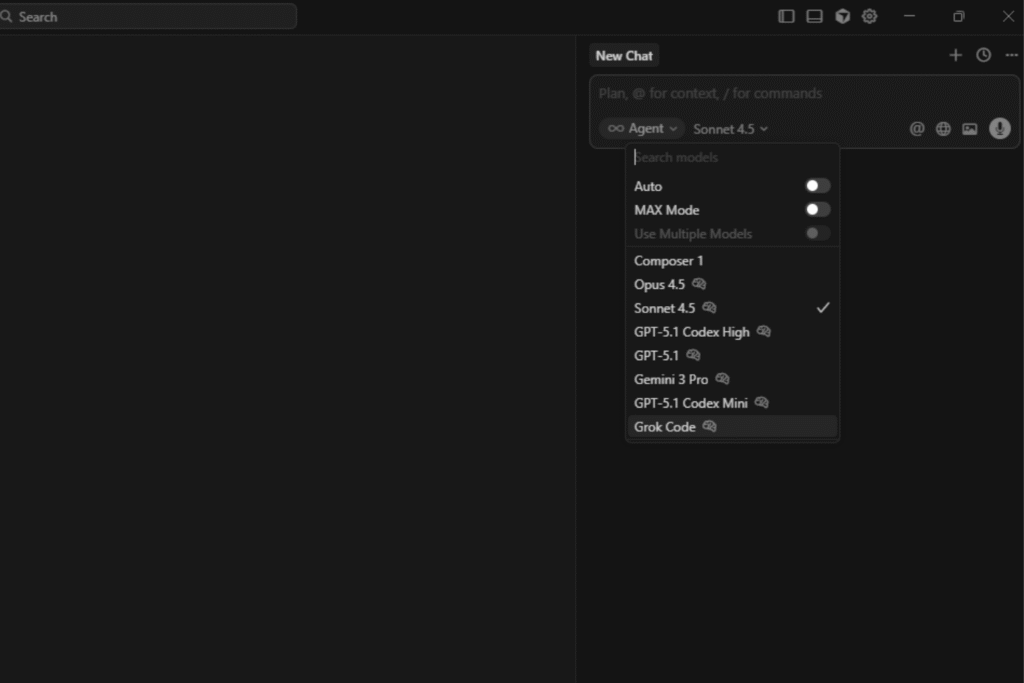
Currently, the platform allows switching between the most powerful models on the market, the main ones being...Claude 4.5 Sonnet of Anthropic and the GPT-5.1 from OpenAI.
Technically, study and practice show that the Claude 4.5 Sonnet has excelled significantly in coding tasks.
His logical reasoning skills and lower rate of hallucination in complex architectures make him a favorite for Composer mode.
GPT-5.1, on the other hand, maintains its strength in general and explanatory knowledge.
Cursor allows you to choose the ideal model for each task. Need to refactor a complex algorithm? Claude 4.5 Sonnet.
Need to generate documentation or explain a concept to a junior developer? GPT-40 can be more verbose and didactic.
This freedom of choice puts the developer in control of their "stack of intelligence," something frequently debated by technology leaders such as Simon Willison.
AI model selection menu within Cursor, highlighting the Claude 4.5 Sonnet and GPT 5.1 options.
Cursor vs. VS Code + Copilot: The Verdict
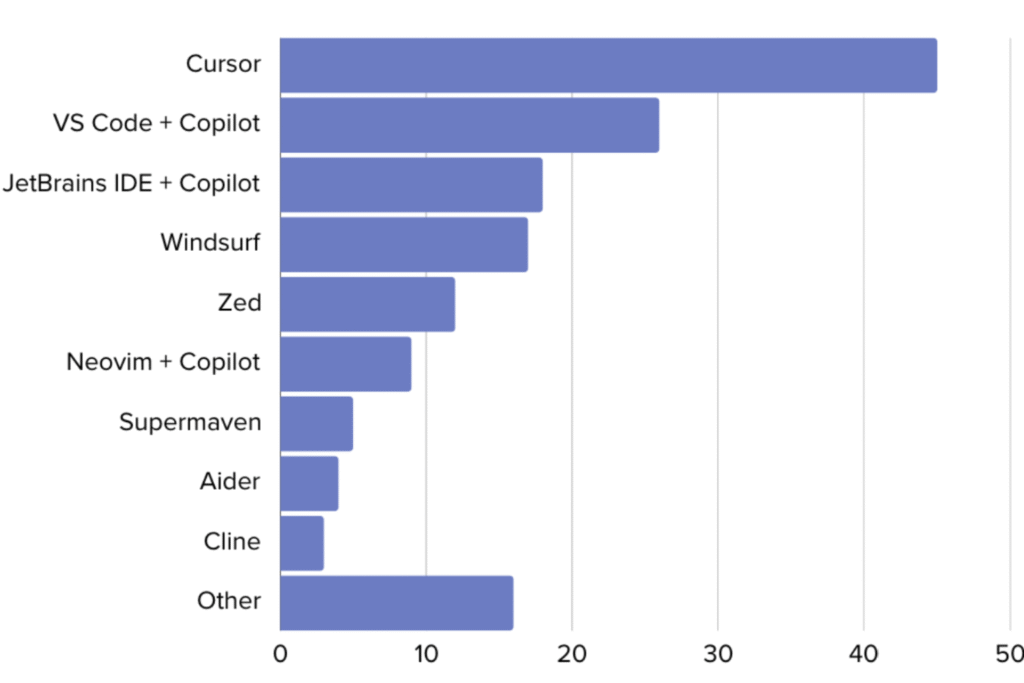
Comparison is inevitable. Why migrate if VS Code already works? The answer lies in deep integration.
The VS Code + Copilot combo suffers from fragmentation issues, as pointed out in... detailed comparisons of Walturn. Copilot, being an extension, has limited access to the file tree and the terminal.
Cursor, on the other hand, has agent capabilities. It can read errors in the terminal and suggest automatic corrections with a single click.
It can index documentation from external libraries (using the @Docs command) so that the AI can learn to use tools that were released yesterday, something that Copilot, trained on static data, has difficulty doing.
Furthermore, privacy is a central pillar. Cursor offers a Privacy Mode where no code leaves your machine for model training, ensuring the data security and usage Intellectual property rights are a critical concern for businesses and startups.
How to Migrate and Properly Start Using Cursor
The barrier to entry for Cursor is virtually nonexistent for those already using VS Code. Being a fork, it allows you to import all your extensions, themes, and shortcuts (keybindings) with a single click during installation.
Instead of “"create a button"”, use “Create a reusable button component using Tailwind CSS, with 'primary' and 'secondary' variants, following the existing design system pattern in @Button.tsx.‘.
Continuing Education: Tools change rapidly. Keep up with updated content on our [website/platform]. No Code Startup Blog It ensures you don't become obsolete.
Visual comparison chart showing the development speed between traditional VS Code and Cursor AI, highlighting the reduction in refactoring time.
FAQ: Frequently Asked Questions about the Cursor
To address common questions we see in Google searches and in communities like... Reddit, We have prepared straightforward answers:
Is Cursor free?
Cursor has a free (Hobby) plan that is quite generous, offering limited access to premium models and unlimited access to the cursor-small model (faster, but less intelligent). For details on limits and costs, please see the [link/document/etc.]. official pricing page.
Does the Cursor work with VS Code extensions?
Yes, perfectly. As the Cursor is a fork From VS Code, it accesses the same marketplace. Your Python extensions, Docker, ESLint, and favorite themes will work natively.
Is my code data used to train the AI?
By default, Cursor has robust privacy settings. If you enable "Privacy Mode," your code is not stored on Cursor's servers or used for model training, ensuring complete confidentiality for enterprise projects.
Does Cursor replace a junior developer?
It doesn't replace, but it enhances. Cursor acts as a force multiplier. It allows a junior to produce at the quality of a full-fledged player, provided there is logical supervision.
For those who don't know how to program at all, we recommend starting with... AI Coding Training to understand the fundamentals needed to guide AI.
What is the difference between Cursor and Windsurf?
Both are modern AI-Native editors. Windsurf It focuses heavily on "Flows" and in-depth knowledge of the application's state, while the Cursor stands out for its speed of interaction with the Tab key and Composer mode.
I know, I know: yet another AI (Artificial Intelligence) platform on the market?
The difference is that this tool promises to unify the best AI models into a single interface, completely changing the way we work with them. Large Language Models (LLMs).
My name is Neto, and I believe this platform can save you a lot of money and, if you know how to use it well, even make you money with it. Let's look at the features that promise to make it indispensable.
Contents
Simultaneous use of multiple models (OpenAI/Anthropic/Google/Deepseek)
Right off the bat, the interface is familiar, very similar to ChatGPT, with a large chat window for communicating with the model. But the magic begins when you look up: I can change the model at any time.
We have access to various models of OpenAI, In addition to the main models from other LLM providers, such as Anthropic, Google (Gemini), DeepSeek and XAI.
This already allows for a quick comparison of responses between different models, which is great for power users In pursuit of performance, especially when new models are released.
But the feature that I find most interesting is... context retention. If I'm talking to the GPT-5, I switch to the Cloud Hyco and then to the Gemini Flash, the new model understands. all The history of the conversation.
This is a game-changer, because I can use LLM for what it does best: I get the information, and if I need a different type of analysis, I switch to another LLM to continue the conversation exactly where I left off.
Custom prompts: creation, variables, and shortcuts
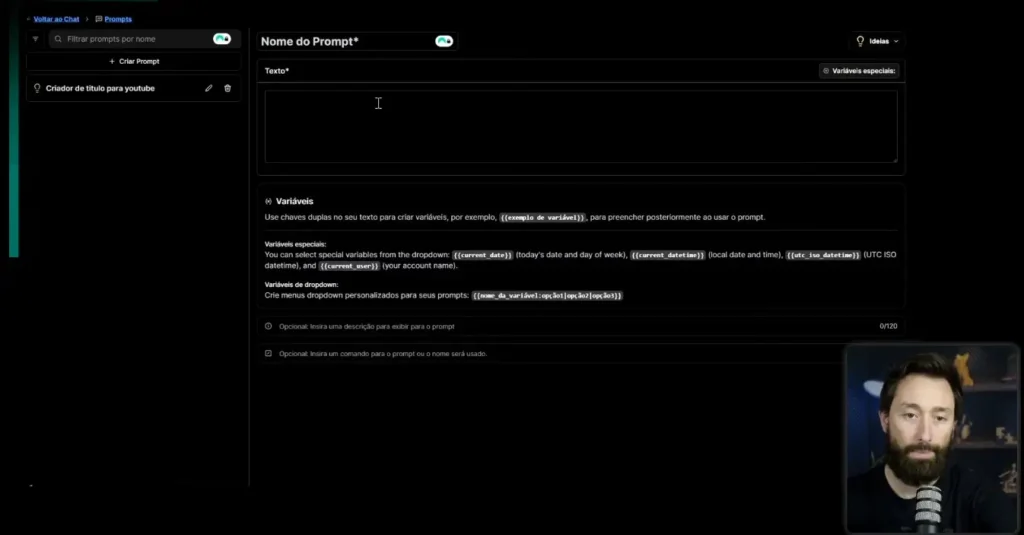
In my opinion, this is the coolest and most unique feature we have on the market. It's the custom prompt creator.
You can create a gigantic prompt from scratch and insert variables, such as "video theme" or "title tone".
Once completed, the prompt transforms into a super simplified interface: simply fill in the theme and tone, press Enter, and the AI will use the complete prompt you created.
In addition to organizing your workflow, you can create shortcuts (using the / command) to list all your custom prompts and quickly access them in the chat. This is excellent for standardizing the work of an entire team.
Uploading and interpreting PDF files
Another extremely useful function for everyday use is file interpretation. You can attach files in various formats.
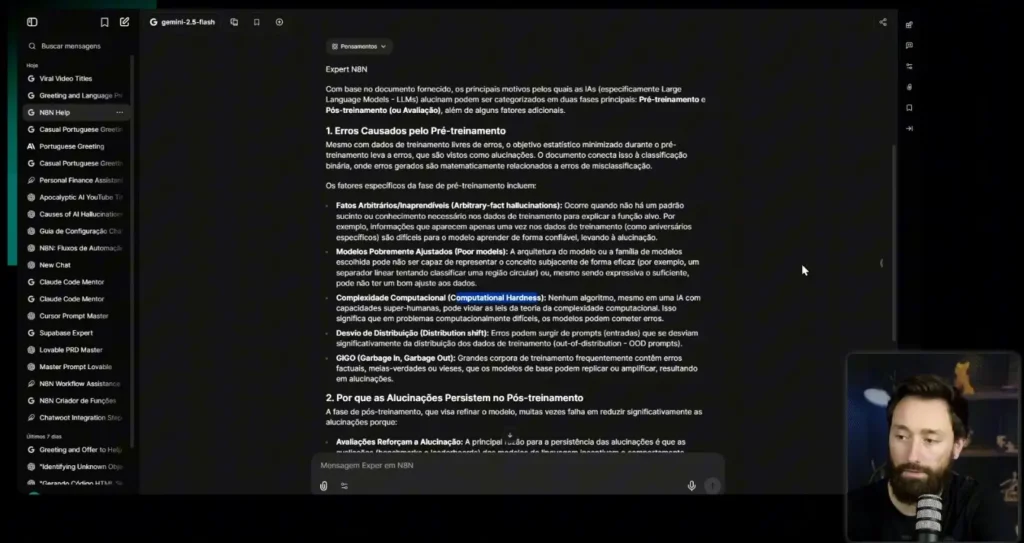
To test it, I played a paper From OpenAI, a dense, 36-page article in English about why AIs hallucinate.
When asked about the main reasons for the hallucination, the AI went directly to the PDF's content. It searched and listed the reasons, such as... arbitrary facts hallucinations and pure models.
This ability to search for information in more technical papers or lengthy documents greatly helps us to understand in depth any topic that needs to be studied.
How to guarantee access and Black Friday deals
Adding up the cost of the main LLMs available on the platform (OpenAI, Anthropic, Gemini, Grok, DeepSeek), the value would be around R$ 400 per month if we subscribed to them all individually.
The big news is that this platform, which we affectionately call "MyGPT," is priceless and... It is not open to the public. right now.
However, you can access it exclusively and almost for free. We are providing access to the platform for... one year, with no additional costs, for those who purchase our Black Friday offer.
This is the biggest offer and the biggest discount in the history of our ecosystem. It's a limited window of opportunity for you to enter and receive this exclusive bonus.
Questions, discounts and No Code community
I take this opportunity to extend the invitation and open the floor for questions.
If you have any questions about the platform, its features, the Black Friday offer, or the NoCode Startup ecosystem, leave them in the comments.
We always read and respond to all comments and welcome suggestions for new videos.
I hope I've demonstrated the potential of this new tool. It's the key to unifying your models and optimizing your AI workflow.
O Lovable It is leading an irreversible paradigm shift in the current software development market.
If the last decade was marked by the frantic pursuit of agility through the MVP (Minimum Viable Product), the present points to a much greater demand: immediate emotional connection.
In this context, the technical embodiment of this new philosophy is what we call Vibe Coding.
In this context, the Lovable It does not simply emerge as another option among the best Vibe Coding tools, ...but as the ultimate platform for those seeking excellence.
The technical entry barrier has collapsed; the new barrier is... quality of intention and the sophistication of the design.
For the technical entrepreneur and the agile innovator, understanding this transition to a creative development It's not optional. It's about mastering the ability to orchestrate Artificial Intelligence to create products that not only work, but that delight.
In this technical dossier, we will explore the triad that underpins this revolution — Product, Philosophy and Process — and we'll explore how you can leverage Lovable.dev's infrastructure to skip steps and deliver world-class software from the very first commit.
Lovable.dev's development interface displaying AI-generated React and Tailwind code alongside a real-time application preview.
The Lovable Ecosystem: Much More Than a Code Editor
When analyzing the current ecosystem, we realize that the success of Lovable This is no accident. It is the apex of three massive trends that have been mapped in recent studies on the future of software engineering.
To navigate this new ocean, we need to separate the noise from the signal.
1. The Product: The Engineering Behind Lovable.dev
Unlike legacy visual builders that generate "spaghetti code," Lovable operates as a... Senior full-stack engineer on demand.
He uses advanced language models (LLMs) to write clean, modern code — typically a stack composed of React, Tailwind CSS and Supabase.
This solves a long-standing pain point in the No-Code market: the lock-in (Technological lock-in). Because the platform generates market-standard code, sovereignty over software reverts to the creator.
"Generative AI for interfaces" tools are becoming the new standard for high-fidelity prototyping, allowing the focus to shift from implementation to solution architecture.
2. The Philosophy: The Silent Death of the MVP
The MVP concept, popularized by Eric Ries, served its purpose, but created a harmful side effect: a flood of "viable" but mediocre products with poor UX and forgettable design.
The trend study points to the rise of MLP (Minimum Lovable Product).
The MLP philosophy dictates that the initial version of a product should contain the fewest features necessary to be... loved, not just tolerated.
In a saturated market, "viability" is a commodity; "friendliness" is the real competitive advantage.
3. The Process: Vibe Coding as a Methodology
Perhaps the most radical change is in the developer's routine. The term Vibe Coding, The term, recently coined in the tech community, refers to a state of flow where coding happens at the speed of thought.
“Vibe Coding is about keeping the creative energy high, letting AI handle the boring syntax while you focus on the symphony of the product.”
Influential sources on Medium, such as Hiren Dhaduk, They describe this as "Vibe-Driven Development," where you code like an artist. It's a direct response to the cognitive fatigue of traditional programming.
Instead of fighting compilation errors, you engage in dialogue with the machine to refine the application's "vibe".
Comparative graph demonstrating the value curve between a traditional MVP (focused only on functionality) and an MLP (focused on design and emotion from the start).
How Lovable Applies Vibe Coding in Practice
The promise of Vibe Coding goes beyond marketing; it has profound technical implications for how we structure projects within the... Lovable.
Technical articles in DEV Community They warn that, although the speed increases, so does the responsibility for architecture.
The End of the “Blank Screen”
In the traditional model, you start with an empty file. In Vibe Coding with Lovable, you start with an intention.
The platform acts as a catalyst, instantly transforming prompts into responsive interfaces.
This is corroborated by analyses of companies such as AllianceTek, who see AI-assisted development transforming engineers into technical product managers.
The Importance of Human Curation
Despite automation, the human element has never been more crucial. An insightful article on Medium titled “"Beyond the Vibe"” He argues that AI can write the code, but it cannot "feel" the product.
The ability to fine-tune the UX, decide on the interface's tone of voice, and prioritize features remains irreplaceable.
To master this curation, a solid foundation is essential. This is where... No Code Start Up It stands out by offering learning paths that teach not only how to push buttons, but how to think like a modern software architect.
Building a Lovable Product (MLP): The End of the MVP
How to apply the MLP concept using the Lovable In practice? The key lies in the integration between aesthetics and functionality.
Automated Design System
Lovable uses libraries such as [list of libraries would go here] by default. shadcn/ui, These are state-of-the-art React interface designs. This ensures your application doesn't have that "prototype look".
It is born with professional-grade typography, spacing, and components.
According to insights from Upstatement, "Loveable" products are built on deep user insights, something that rapid prototyping via AI facilitates by allowing for near-immediate usability testing.
Focus on User Experience (UX)
Creating an MLP requires you to spend your "innovation tokens" on what differentiates your product.
If you're building a marketplace, don't waste time coding the login system from scratch; use AI to integrate robust authentication in minutes and focus on the shopping experience.
Not everything is rosy in the garden of Vibe Coding. It's crucial to have a realistic view of it. Lovable to avoid falling into common traps.
Code Hallucinations: AI may import libraries that don't exist or use deprecated syntax. Technical oversight is mandatory.
Data Security: When connecting to real databases (such as Supabase), you need to ensure that the RLS (Row Level Security) rules are configured correctly. The AI handles the basics, but the auditing is your responsibility.
Scalability: Discussions in Hacker News There is often debate about whether AI-generated code is maintainable in the long term. The answer is yes., if you maintained good modularization practices from the beginning.
Japanese technology platforms, such as Note.com, They have also discussed how this approach is changing the Asian market, proving that the phenomenon is global.
Powerful Integrations with Lovable: Connect Your Application to the Real World
Powerful Integrations with Lovable: Connect Your Application to the Real World
The true power of Lovable It lies in the ability to create applications that don't live in isolation.
The platform allows you to connect your solution to external APIs, databases, automation services, and any endpoint available on the web, all guided by AI intelligence.
With a simple command like “"Create a function that calls the OpenAI API to summarize text."”, Lovable handles the integration, structures the code, and even explains how everything works.
This level of automation paves the way for building:
SaaS complete and scalable
Internal tools that automate operations.
Applications that communicate with multiple services in real time.
Intelligent dashboards that process data automatically.
Furthermore, Lovable understands patterns in REST APIs, GraphQL, token-based authentication, custom headers, and complex flows—drastically reducing development time.
If you're looking to understand more about how to analyze data within these applications, our content on [topic] is available here. AI for no-code data analysis It's a must-read.
Frequently Asked Questions about Lovable
Here we answer the real questions that arise in searches about Lovable and AI-assisted development.
1. Does Lovable replace senior developers?
No. It empowers developers and allows generalists to do the work of specialists. However, for complex architectures and performance optimization, in-depth engineering knowledge is still vital.
2. Can I export my Lovable code to GitHub?
Yes. That's one of them. features Stronger features (killer features). You can sync directly with GitHub, enabling a professional CI/CD (Continuous Integration and Continuous Delivery) workflow.
3. What is the difference between Lovable and Bolt.new or v0?
While v0 (from Vercel) focuses on interface components (copy-paste), Lovable and Bolt attempt to deliver functional full-stack applications. Lovable stands out for its focus on "lovable" aesthetics (MLP) and ease of use for founders.
4. Is it possible to create (native) mobile applications with Lovable?
The main focus is web (React). For native applications, you can use technologies like PWA (Progressive Web Apps) or wrappers. If your focus is native mobile 100%, we recommend exploring the universe. FlutterFlow.
5. How much does it cost to use Lovable for a commercial project?
Prices vary and generally involve tiers based on AI token usage. It's vital to consult the official page, but the ROI (Return on Investment) is usually high due to the speed of delivery.
Master Lovable and the New Era of Software
Master Lovable and the New Era of Software
The era of manual, handcrafted coding for repetitive tasks is over. Lovable it's the Vibe Coding They are not just a passing trend; they are the new standard of efficiency for those who wish to build the future.
The difference between the professional who will become obsolete and the one who will lead the market lies in their ability to adapt to these new tools.
Don't just read about the revolution. Be the revolution.
To become a master at creating AI-powered softwares, mastering MLP architecture, and staying ahead of the market, your next step is clear.
Learn how to create, iterate, and scale digital products with the methodology that is redefining Silicon Valley. The future is "lovable," and you can build it today.














 EN
EN  PT
PT  ES
ES