Hey everyone! Native LLM, multi-agent architecture, orchestration, coupled browser, and voice prompt. These are the big new features of Cursor 2.0.
Nice to meet you, I'm Anderson Brandão, and I'll be here with you on... NoCode Startup Speaking of VibeCode and related development topics. Cursor 2.0, the tool most used by us VibeCoders, has brought incredible updates.
I hope you enjoy it and learn along with me everything this new version has to offer!
Contents
New features of Cursor 2.0 and overview of the tool.
Right off the bat, we noticed that the Cursor now has two display options: the "Agents" tab and the "Editor" tab.
The "Editor" tab is the traditional view of the Cursor, which is basically a fork From VSCode, with our file area, terminal, and chat with the agent. But this chat, until then, was done in a linear way. Remember that word: linear.
In the previous version, you sent a prompt, It would receive the response, analyze it, send another prompt, and so on. This is where one of the biggest changes lies.
Multi-agent architecture and new possibilities
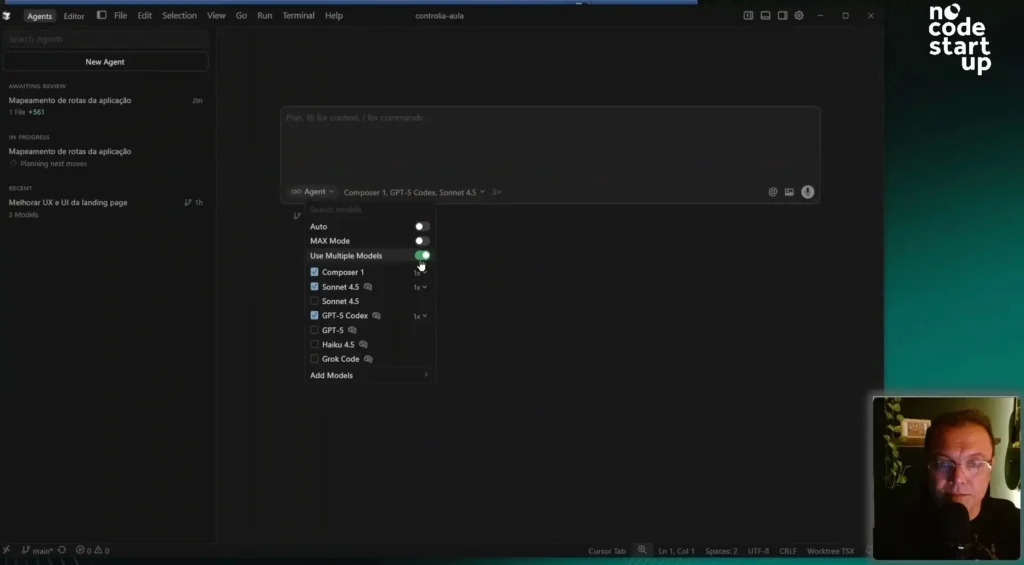
In the new "Agents" tab, Cursor introduces a new architecture, enabling work with multiple agents.
Here in the left sidebar, you'll find our multiple agents, and you'll be able to work with up to eight of them simultaneously. That's a major game-changer.
Where will this be useful? In medium and large-scale applications, where we have well-defined modules. You can have one agent working on one module and another agent on another, in parallel.
Composer 1 – a native LLM and its performance
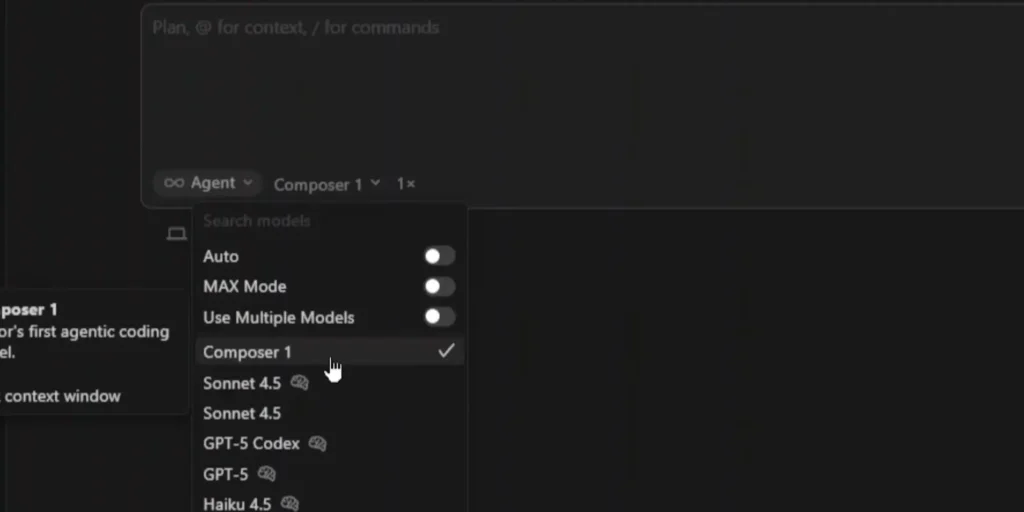
The other big news is Composer 1, the LLM (Language Model) native of Cursor.
To test if it's really as fast as they say, I did a practical test. I got a prompt asking to map the application and create an MD file of routes.
First, I passed the prompt to the GPT-5 Codex and waited a few seconds. Then, I opened a new agent, pasted the same I pressed the prompt and selected Composer 1.
The result? While I was speaking, Composer was already "going full steam ahead." It finished the routes.MD file with impressive speed. Meanwhile, the GPT Codex was still reading the files and planning the next steps.
Although I think Composer may not have the same ability to solve complex problems as more established LLMs like Claude or GPT Codex, its speed is a key advantage. I'll venture to say that I'll use Composer a lot for tasks that don't require much complexity.
Practical tests with multiple models (Composer, Sonnet and GPT-5 Codecs)
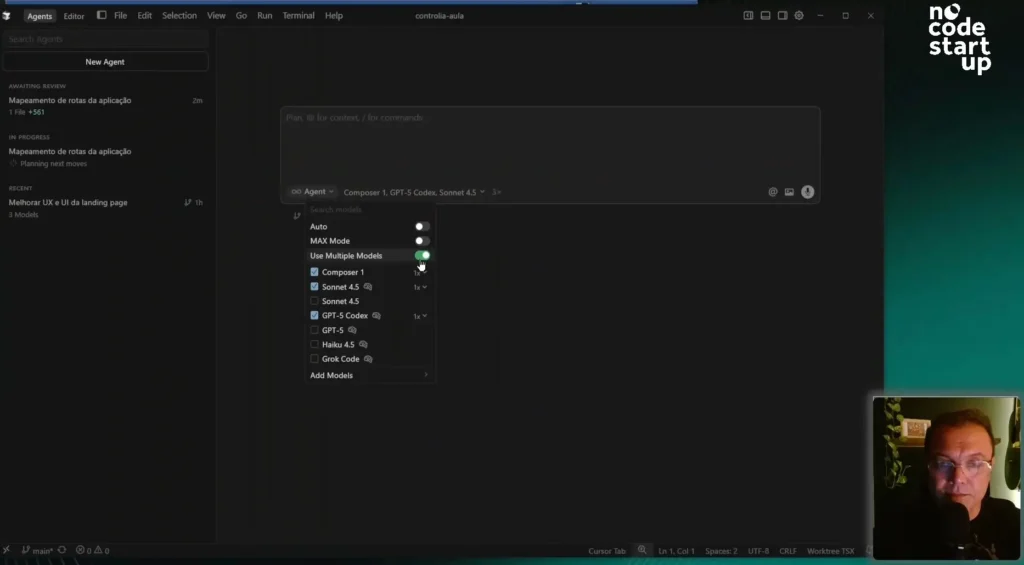
Now, I want to show you another feature: using multiple models to run the... same task.
To do this, I configured an agent by selecting three LLMs at the same time: Composer, Sonnet 4.5, and GPT Codex.
The prompt I gave to the three of them was: "improve the UX and UI of the landing page to get better sales results," referencing a file from my project.
This is excellent for running tests and seeing which LLM performs best for each type of task.
Comparison of results between LLMs
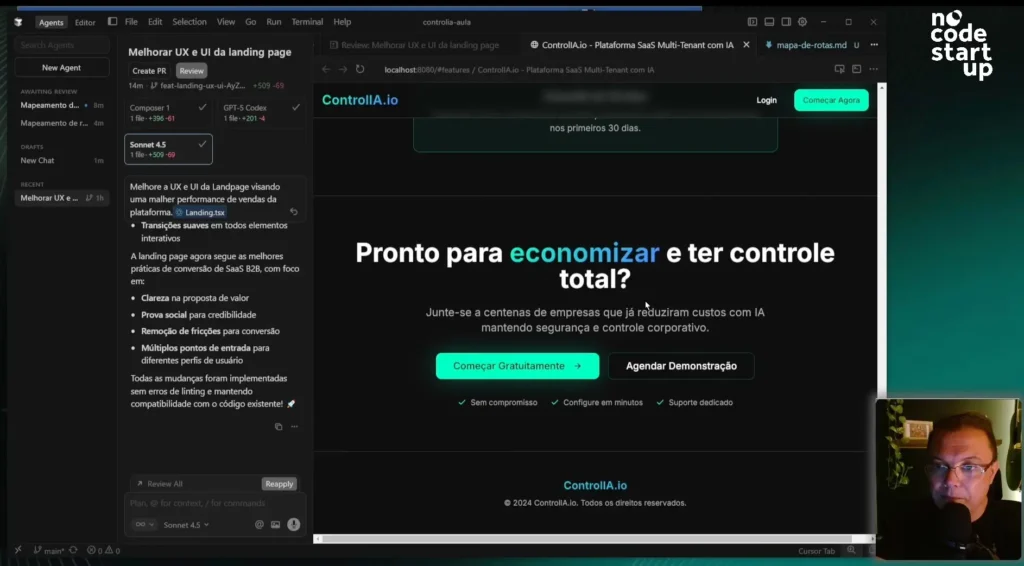
To analyze the responses, I used another new feature: the "Browser Tab," a browser attached directly to the cursor.
First, I saw the result from Composer 1. I used "Apply" and "full overwrite". Honestly, it didn't change much. For layout and UX/UI, I wouldn't use Composer anymore.
Then, I applied the results from the GPT-5 Codex. It's already changed quite a bit, adding more cards, more features, social proof, and even a FAQ. I liked the approach.
Finally, I applied the SONET 4.5 test. And, in my opinion, SONET won.
Right off the bat, he presented a call to action much more aligned with my sales pitch: "Reduce up to 70% of your AI costs while maintaining total control." He added a cost comparison (with and without the tool), social proof, and an already open FAQ. Fantastic!
I ran the same prompt through three tools and was able to choose which one to apply. In this case, I chose the... SONET 4.5.
Visual testing and interaction with the console.
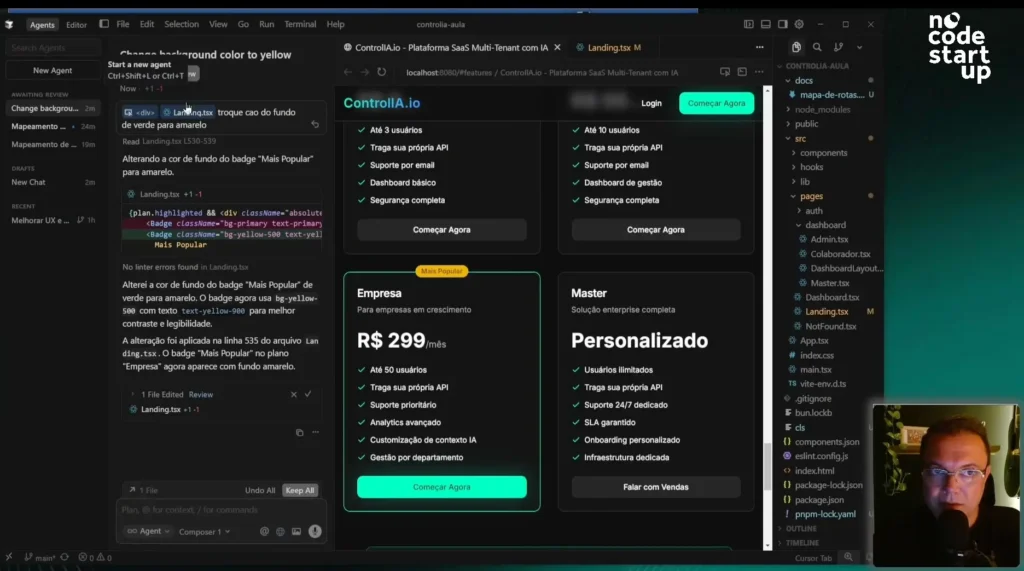
Speaking of the "Browser Tab," it has other very useful controls, such as the option to activate the console and the "Select Element" function.
This "Select Element" function is amazing. You can click on an icon, visually select an element on the page (like a div), and it automatically comes to your prompt.
I tested it: I selected a div and asked, "change the background color from green to yellow." It knew exactly which object it was.
This feature is extremely useful, especially for those who don't have much coding knowledge, as it eliminates the need to worry about finding the exact object on the page.
Voice prompt and final analysis of functionalities.
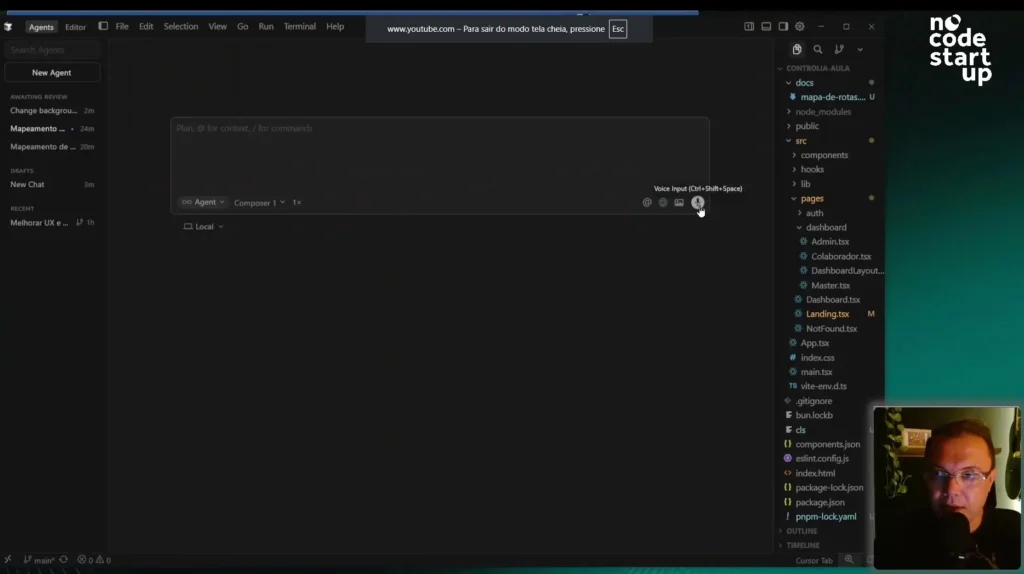
Finally, we have the microphone, which is the voice prompt.
I sent an audio message in Portuguese: "Analyze the landing page and suggest UX and UI improvements.".
What did he do? He transcribed my audio and immediately translated the prompt into English. This is an important point: LLMs still have a preference for understanding the context of the prompt in English.
With that, we've covered all the fantastic new features of Cursor 2.0. If you found this content relevant, please like and subscribe to the channel to join the largest VibeCode community in Brazil.
Here's an invitation for you to delve even deeper:
Get to know the AI Coding Training.
















 EN
EN  PT
PT  ES
ES