The history of software development has always been marked by the relentless pursuit of efficiency. From the first simple text editors to robust Integrated Development Environments (IDEs), the goal has always been to reduce the programmer's cognitive load.
However, we are experiencing a tectonic shift in this scenario. The Cursor It emerges not just as another tool, but as the harbinger of a new era: that of editors. AI-Native.
Unlike traditional approaches that attempt to "graft" artificial intelligence onto legacy platforms, Cursor was designed from its source code to operate in symbiosis with Large Language Models (LLMs).
In this article, we will delve deeply into the technical and practical architecture of the Cursor, exploring how it allows the Visual Studio Code This article explores traditional methods and how you can use this tool to create complex softwares, even if your foundation is low-code or no-code.

What Does It Really Mean to Be an “AI-Native” Editor?
Many professionals still confuse the use of AI extensions with the use of a native environment. Until recently, the norm was to install plugins, such as... GitHub Copilot, within Visual Studio Code.
Although useful for completing lines (the famous inline completionThis model has a severe structural limitation: AI is a "tourist" in its editor. It doesn't "see" the whole picture.
Cursor breaks with this limitation through an architecture. AI-Native. Being a fork (an offshoot) of VS Code itself, it maintains the familiar interface that everyone loves, but rewrites the fundamental interactions.
This means that AI isn't just suggesting the next word; it has the permission and ability to read your project's structure, understand the context of multiple files simultaneously, and even predict where you'll click next.
This distinction is crucial for anyone wishing to work with AI Coding.
While older tools act as a glorified spell checker, Cursor acts as a senior engineer sitting next to you, capable of refactoring entire architectures because it understands the semantics of your project, not just the syntax of the open file.
Learn more about how AI infrastructure is changing the market in this article.
Game-Changing Features (Deep Dive)
To master the Cursor, it's necessary to go beyond the basics, something frequently discussed in... in-depth technical analyses about the tool.
The features that truly deliver exponential productivity gains — often referred to as "programming at the speed of thought" — reside in three main pillars: Tab, Composer, and Context-Aware Chat.
Let's dissect each one of them.
Cursor Tab: The Evolution of Autocomplete
Forget traditional autocomplete that only suggests variable names. The Cursor Tab It is powered by a custom model designed to predict. diffs (differences) integers.
As you type, the Cursor isn't just trying to guess the next word. It maintains an up-to-date representation of your code and suggests complex modifications that may span multiple lines.
The real magic happens in its ability to predict the cursor's location. If you've just edited a function and move your mouse to the test file, Cursor Tab will often already have the written test waiting only for your confirmation.
This drastically reduces the need for repetitive typing and manual navigation.
The Power of Composer Mode
If the Tab key is the evolution of writing, then... Composer It's the revolution in architecture. Accessed via the shortcut Ctrl+I (or Cmd+I), Composer allows you to write a prompt in natural language to edit multiple files simultaneously.
Imagine you need to modify a field in your application's database. In a standard editor, you would need to:
- Change the bank's schema.
- Update the API on the back-end.
- Adjust the typing on the front-end.
- Fix the user interface.
With Cursor Composer, you can simply type: “Add the 'phone' field to the users table, update the API to receive this data, and display the input in the registration form.‘ .
The editor will analyze the project dependencies, open all relevant files, and apply the changes in an orchestrated manner.
For our students AI Coding Training, This functionality is the "holy grail" that allows you to create complete SaaSs with technical knowledge focused on logic and architecture, delegating the syntax to AI.

Chat and Global Context (@Codebase)
The biggest headache when using generic LLMs, such as ChatGPT in the browser, is the lack of context. You have to copy and paste code snippets incessantly.
Cursor solves this with local vector indexing.
When using the sidebar chat (Ctrl+L), you can invoke the @Codebase command. This instructs the template to scan your entire repository for semantic relevance before responding.
If you ask “"Where is user authentication performed?"”, Cursor won't hallucinate; it will search its real files and pinpoint the exact location.
This transforms the process of onboarding in older projects and maintaining legacy code in trivial tasks.
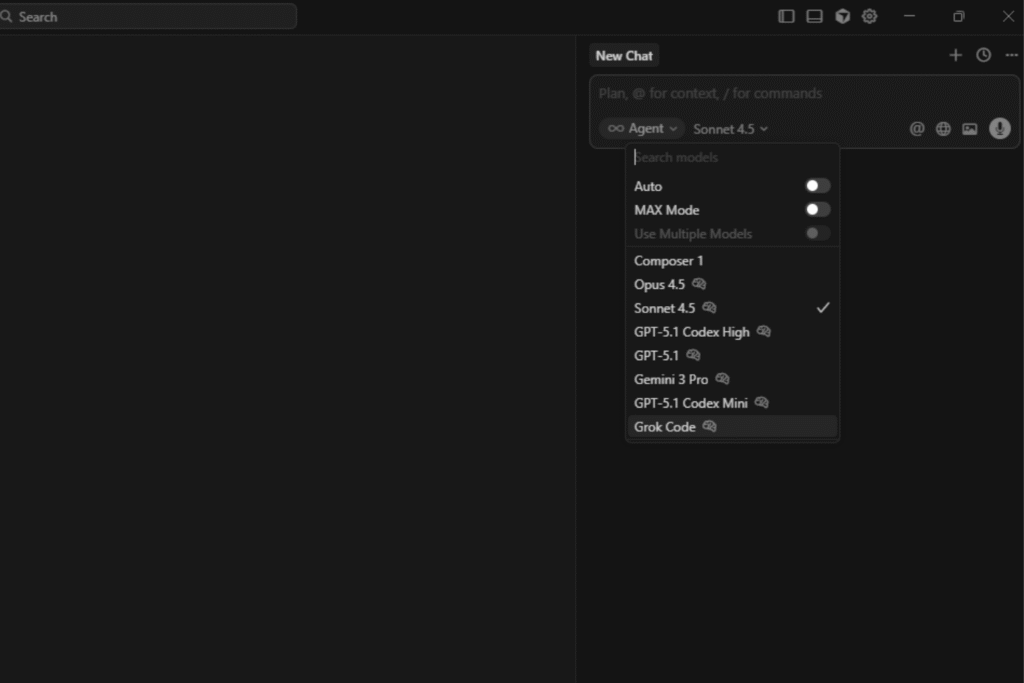
The Battle of the Models: Claude 4.5 Sonnet vs. GPT-5.1
One of Cursor's major strategic advantages is its model flexibility.
Currently, the platform allows switching between the most powerful models on the market, the main ones being... Claude 4.5 Sonnet of Anthropic and the GPT-5.1 from OpenAI.
Technically, study and practice show that the Claude 4.5 Sonnet has excelled significantly in coding tasks.
His logical reasoning skills and lower rate of hallucination in complex architectures make him a favorite for Composer mode.
GPT-5.1, on the other hand, maintains its strength in general and explanatory knowledge.
Cursor allows you to choose the ideal model for each task. Need to refactor a complex algorithm? Claude 4.5 Sonnet.
Need to generate documentation or explain a concept to a junior developer? GPT-40 can be more verbose and didactic.
This freedom of choice puts the developer in control of their "stack of intelligence," something frequently debated by technology leaders such as Simon Willison.
Cursor vs. VS Code + Copilot: The Verdict
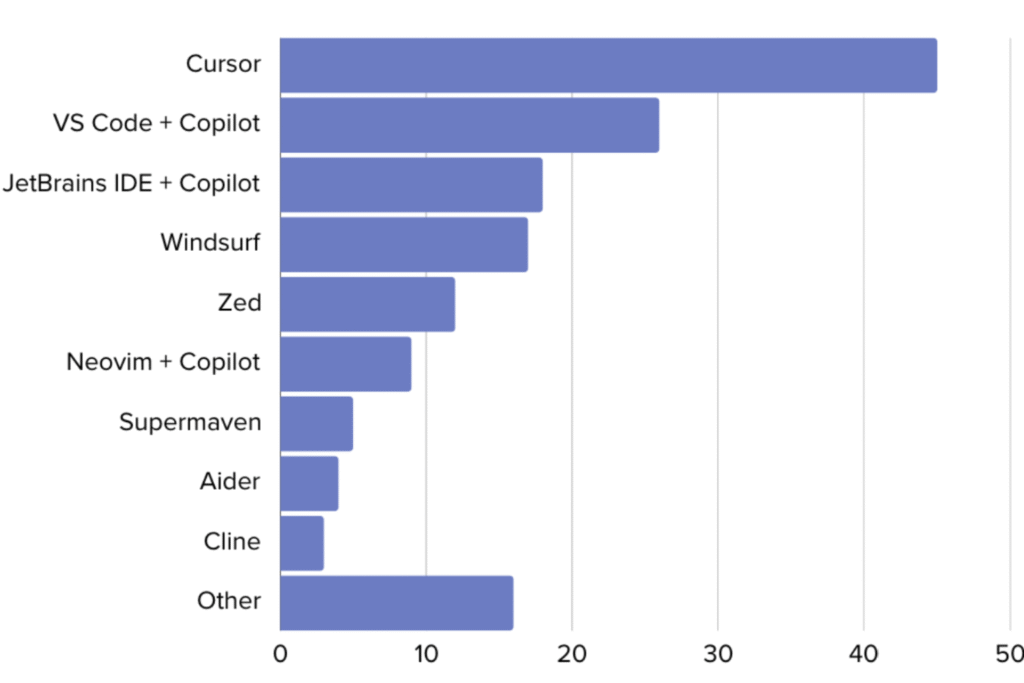
Comparison is inevitable. Why migrate if VS Code already works? The answer lies in deep integration.
The VS Code + Copilot combo suffers from fragmentation issues, as pointed out in... detailed comparisons of Walturn. Copilot, being an extension, has limited access to the file tree and the terminal.
Cursor, on the other hand, has agent capabilities. It can read errors in the terminal and suggest automatic corrections with a single click.
It can index documentation from external libraries (using the @Docs command) so that the AI can learn to use tools that were released yesterday, something that Copilot, trained on static data, has difficulty doing.
Furthermore, privacy is a central pillar. Cursor offers a Privacy Mode where no code leaves your machine for model training, ensuring the data security and usage Intellectual property rights are a critical concern for businesses and startups.
How to Migrate and Properly Start Using Cursor
The barrier to entry for Cursor is virtually nonexistent for those already using VS Code. Being a fork, it allows you to import all your extensions, themes, and shortcuts (keybindings) with a single click during installation.
If you encounter difficulties, the official documentation of common problems It's an excellent resource.
To start off on the right foot, we recommend the following trail:
- Installation and Import: Download the Cursor and accept the import of VS Code settings.
- Codebase Indexing: Allow Cursor to index your local repository to enable advanced context features.
- Prompting Domain: Learning to converse with AI It's the new programming language. Be specific.
Instead of “"create a button"”, use “Create a reusable button component using Tailwind CSS, with 'primary' and 'secondary' variants, following the existing design system pattern in @Button.tsx.‘. - Continuing Education: Tools change rapidly. Keep up with updated content on our [website/platform]. No Code Startup Blog It ensures you don't become obsolete.
FAQ: Frequently Asked Questions about the Cursor
To address common questions we see in Google searches and in communities like... Reddit, We have prepared straightforward answers:
Is Cursor free?
Cursor has a free (Hobby) plan that is quite generous, offering limited access to premium models and unlimited access to the cursor-small model (faster, but less intelligent). For details on limits and costs, please see the [link/document/etc.]. official pricing page.
Does the Cursor work with VS Code extensions?
Yes, perfectly. As the Cursor is a fork From VS Code, it accesses the same marketplace. Your Python extensions, Docker, ESLint, and favorite themes will work natively.
Is my code data used to train the AI?
By default, Cursor has robust privacy settings. If you enable "Privacy Mode," your code is not stored on Cursor's servers or used for model training, ensuring complete confidentiality for enterprise projects.
Does Cursor replace a junior developer?
It doesn't replace, but it enhances. Cursor acts as a force multiplier. It allows a junior to produce at the quality of a full-fledged player, provided there is logical supervision.
For those who don't know how to program at all, we recommend starting with... AI Coding Training to understand the fundamentals needed to guide AI.
What is the difference between Cursor and Windsurf?
Both are modern AI-Native editors. Windsurf It focuses heavily on "Flows" and in-depth knowledge of the application's state, while the Cursor stands out for its speed of interaction with the Tab key and Composer mode.
They exist excellent comparisons on HackerNoon and in Builder.io which detail these differences for teams.

The Future is Hybrid and Accelerated with Cursor
The transition to tools like the cursor isn't just a matter of swapping out a software; it's a change in mindset.
We are moving from the era of manual, character-by-character coding to the era of code orchestration.
The developer of the future spends less time struggling with syntax and more time focusing on solving business problems and designing solutions.
Mastering the cursor is the first step to becoming a professional. AI Coding, capable of delivering projects that previously required an entire team.
The technical barrier has decreased, but the need for logical and structured thinking has never been higher.
If you want to lead this transformation and not just watch it, the time to adapt your workflow is now.
Don't get left behind in the development revolution.
If you want to go beyond theory and master the creation of real softwares with Artificial Intelligence, learn more now about... AI Coding Training.
Learn how to combine Low-Code and AI-Code to build high-level solutions in record time.
















 EN
EN  PT
PT  ES
ES