Have you noticed that the most effective ads today don't look like ads at all? Most of the videos that actually convert on social media have a simple and natural format, as if they were made by real people.
The problem is that producing UGC at scale is expensive and time-consuming. That's when we decided to test a new concept: using AI (Artificial Intelligence) to automatically create UGC videos.
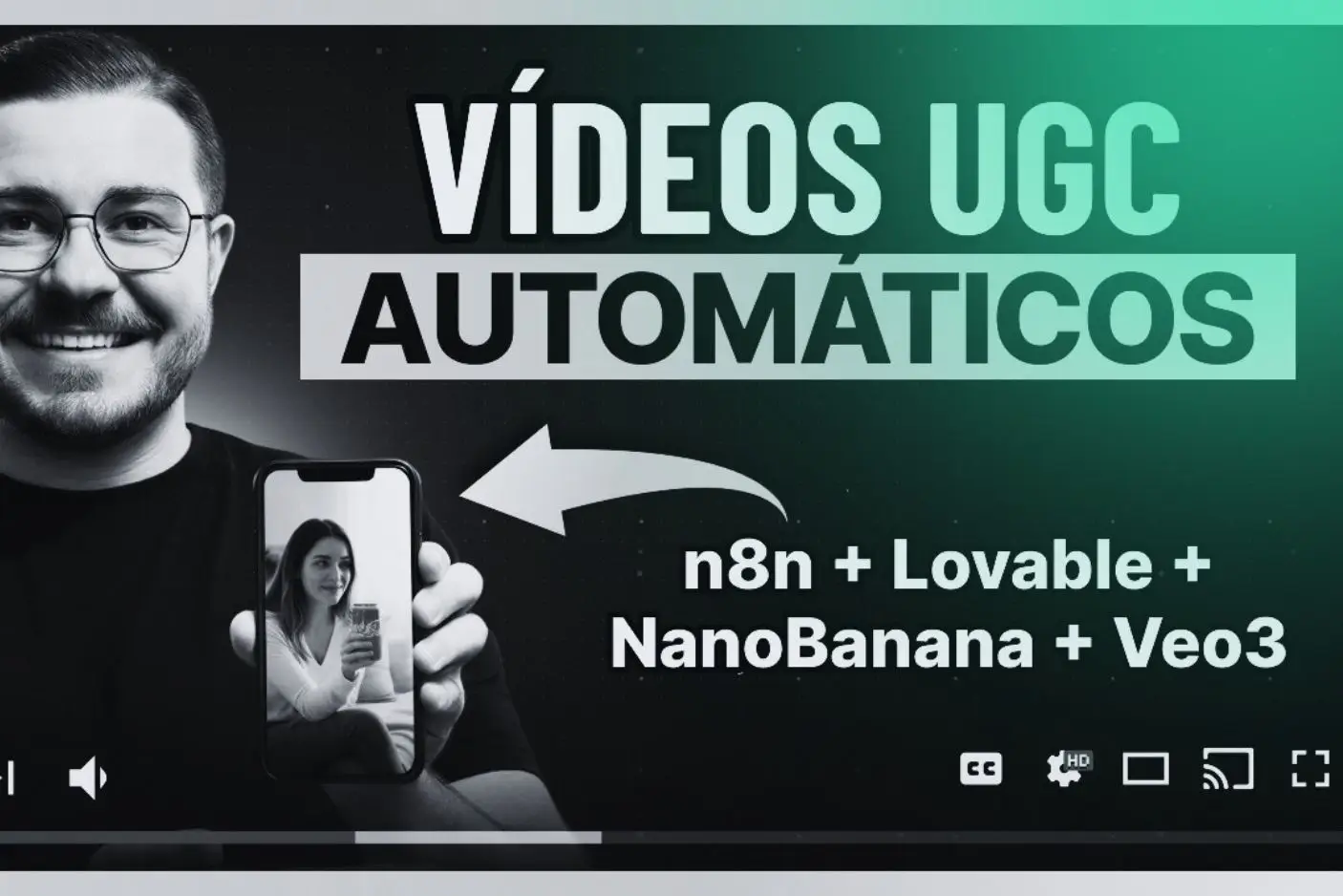
These videos you're about to see were generated from a simple image and a product description, without a camera, without actors, and without editing. Automation does it all.
Contents
What is UGC and why does it convert so much?
The reason why UGC has become the new standard in digital marketing is simple: ultimately, audiences trust people, not brands.
Smart brands understood this and started swapping expensive studios for short, spontaneous videos created using UGC.
As I mentioned, the challenge is that producing this content at scale is expensive and time-consuming. That's where automation comes in.
Process automation: overview
We tested a concept for using AI to automatically create these UGC videos. The process analyzes the image we send, creates the scene, and delivers the finished video in minutes.
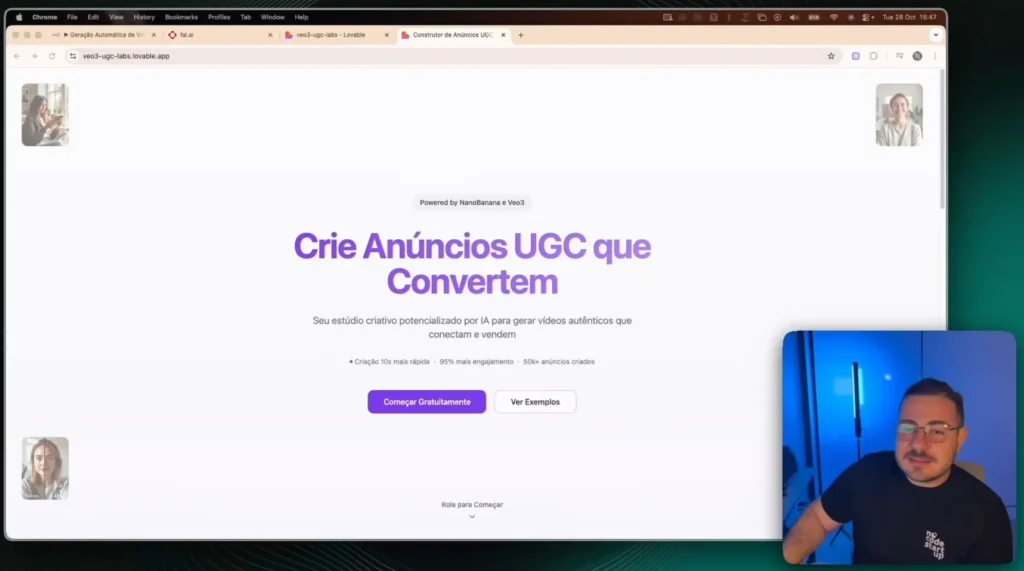
The user simply accesses an app, uploads an image of the product (or the person they want in the photo), writes a brief description of the ad, and enters their email address.
Soon after, the UGC video arrives via email, ready to be used in ads, Reels, or wherever you want.
Practical workflow in Lovable and N8N
To make this work, we use some connected tools.
The user accesses a website that we created in Lovable, which functions as our interface (front-end). When the user clicks on "Create ad," this triggers a webhook for the N8N, which is the brain of all automation.
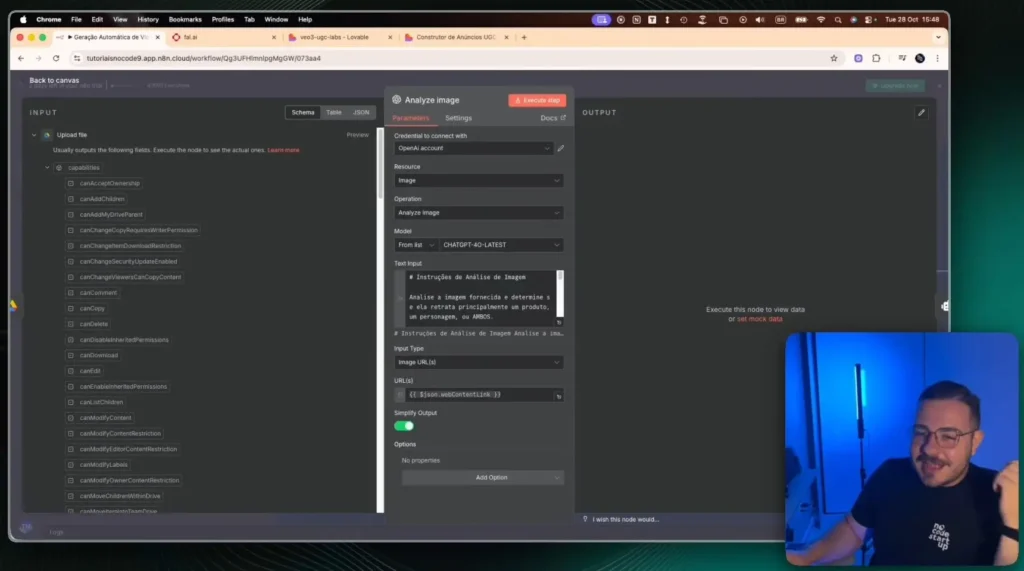
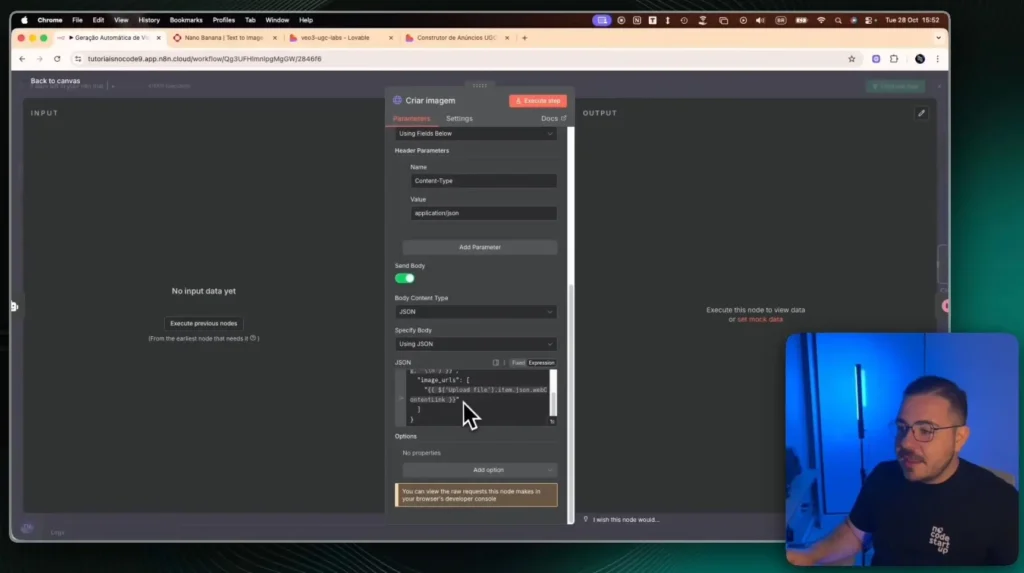
In N8N, the workflow begins by receiving the data: the image, the description, and the email. The first step is to save this image to Google Drive so that we can have a public link to it.
This link is then sent to an AI agent from OpenAI. This agent analyzes the image and creates a YAML file for us, which is basically a detailed technical description of what it "saw" in the image.
AI-powered image and video generation
With the reference image analysis (the YAML) and the user description in hand, N8N begins the creative phase.
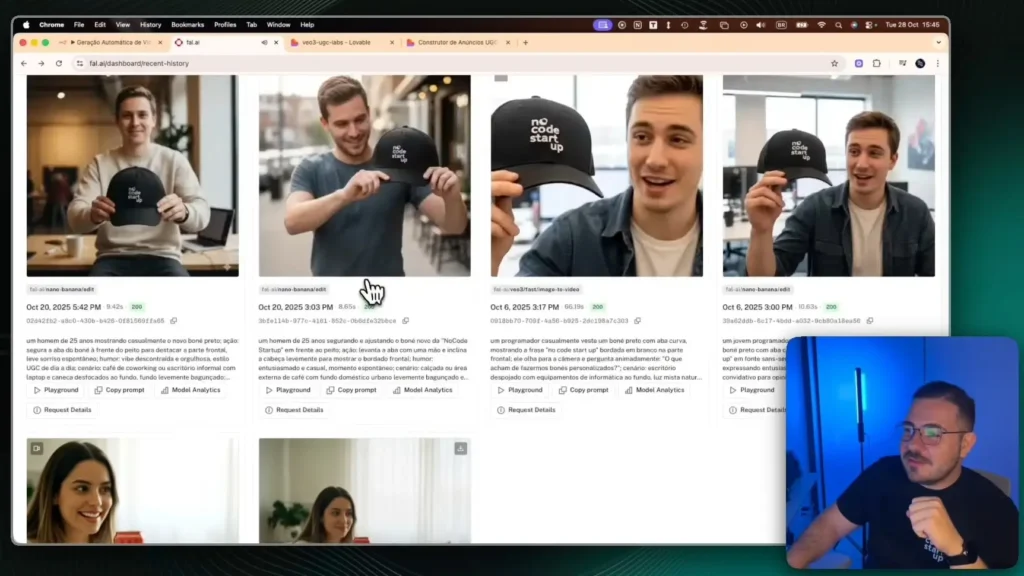
We are using the NanoBanana to create the images and the VO3 to create the videos, both accessed through the platform fall.ai.
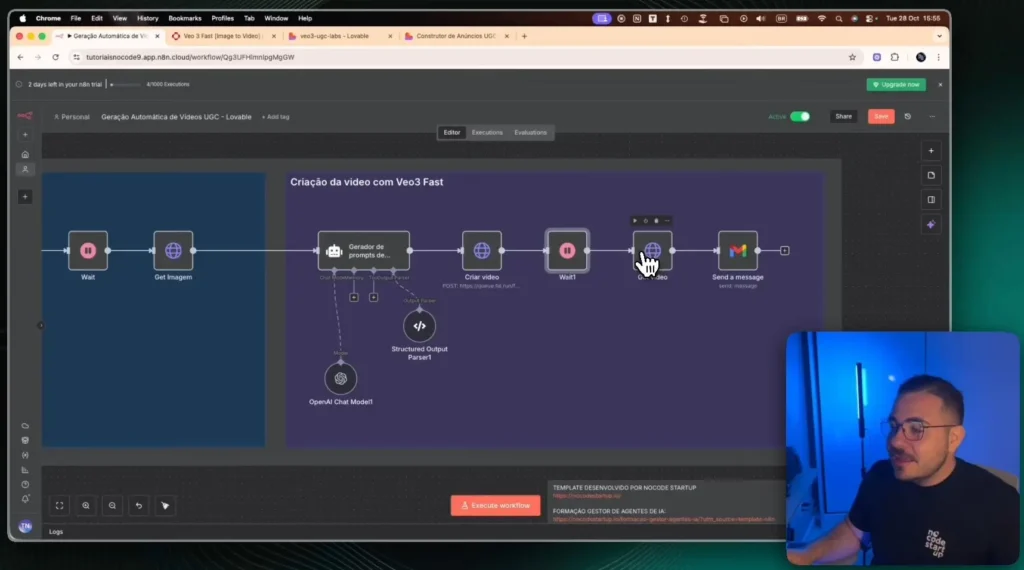
First, a “prompt generator” creates an image prompt, mixing the user's description with AI analysis. This prompt is sent to NanoBanana, which generates the first image (the frame (start of the video).
After waiting 20 seconds for the image to be ready, the N8N does the same thing for the video: it creates a video prompt and sends it to the... VO3 (along with the image we just created).
Since the video takes a little longer, we've added a 3-minute wait. Once it's ready, N8N retrieves the final video link and sends it to the user via email.
Customization and examples of results.
The result is a video that arrives ready in the inbox, with a natural and realistic look, the kind of content that engages. We've seen examples that looked incredibly realistic, as if real people were describing a product.
The coolest part is the technology stack behind it, all without code: Lovable for the interface, N8N as the brain, fall.ai (with NanoBanana and VO3) as the creative AI, and Gmail completing the loop.
The best part is that this same system can be adapted. If you want to generate videos in English, just adjust the prompt. If you want to save a history, just add a database. If you want to sell this as a service, simply connect a checkout.
This same case becomes the basis for dozens of other AI-powered marketing automations.
If you want to learn how to build systems like this, that sell, delight, and automate the impossible, you're invited:
A new "browser war" is underway, but this time, the battle isn't about rendering speed or memory consumption.
It's about intelligence, autonomy, and the fundamental ability to transform intention into action. Amid a wave of updates injecting AI into legacy browsers, the launch of OpenAI Atlas It signals something different, a change in category that most of the market is still misinterpreting.
We are witnessing the transition from assisted computing to agent computing.
These tools offer a "Browser" in "AI," where artificial intelligence acts as a co-pilot restricted to a sidebar.
O OpenAI Atlas, in turn, introduces the “Navigator” Agent”"(Agentic Browser) — a fundamentally new category, where AI is not a passenger, but the pilot itself.".
What is OpenAI Atlas? The Agent Browser vs. the AI Browser?
In practice, the difference is abysmal. The care model summarizes pages, answers questions, and generates text.
What is OpenAI Atlas? The Crucial Distinction Between “Agent” and “Assistant”
To understand the impact of OpenAI Atlas, We first need to unpack the conceptual error that dominates the current conversation.
In its eagerness to label the next big innovation, the market has lumped together two completely distinct product philosophies under the same umbrella of "AI Browser".
This confusion obscures the true revolution that is taking place.
The "AI Navigator" Paradigm: AI as an Assistant (Co-pilot)
The model that has become familiar is that of "Copilot." Tools such as Microsoft Edge (with Copilot), Arc Max, and Gemini integrations in Google Chrome operate under this paradigm.
Artificial intelligence is a supplement attached to an existing browser architecture.
The main focus of these tools is... Recovery and Synthesis information.
The user remains in full control of navigation, and the AI acts as a passive assistant. Typical functions include:
Summarize the content of a web page.
Answer questions about the visible text.
Generate emails or blog posts in a sidebar.
Find related information without the user having to open a new search tab.
In this model, the user question and the browser answer. The agency — the ability to act and make navigational decisions — remains in human hands.
AI cannot, on its own, decide to click a link, add an item to a shopping cart, or fill out a login form.
The "Agent Browser" Revolution: AI as Executor
The “Agent Browser” Revolution: AI as Executor
This is where the OpenAI Atlas and its direct competitor, the Perplexity Comet, They diverge radically.
These are not assistance tools; they are tools of Automation and Execution.
O OpenAI Atlas he was designed from scratch as an “agent platform”. AI is not confined to a sidebar; it is "ubiquitous" and has "contextual awareness" of what is happening on the screen.
It can "see" the DOM (Document Object Model), interpret interface elements, and perform actions.
In this new paradigm, the user delegate and the browser executes. Their capabilities extend far beyond text synthesis:
“"Book a round-trip flight to Lisbon next week, with a budget of €500, using low-cost airlines."”
“"Access the LinkedIn profiles of my startup's top 10 competitors, extract their founders and number of employees, and put them into a spreadsheet."”
“"Log in to my admin panel, navigate to the reports section, and export the sales data for the last quarter."”
Why is this change fundamental to productivity?
The paradigm shift from "assistant" to "agent" is the most significant leap in human-computer interaction since the invention of the graphical user interface.
It's no longer about saving time. reading or writing, but rather to save time doing.
For entrepreneurs, founders, and technology professionals, the productivity bottleneck is rarely a lack of information; it's an excess of "digital manual work"—the dozens of clicks, logins, and repetitive tasks required to run a business.
O OpenAI Atlas It aims to eliminate precisely that friction. It transforms the browser from a passive viewing window into an active digital worker, capable of executing processes.
This is the true promise of artificial intelligence for business, Moving automation from the backend layer (such as APIs) to the front-end layer (the user interface).
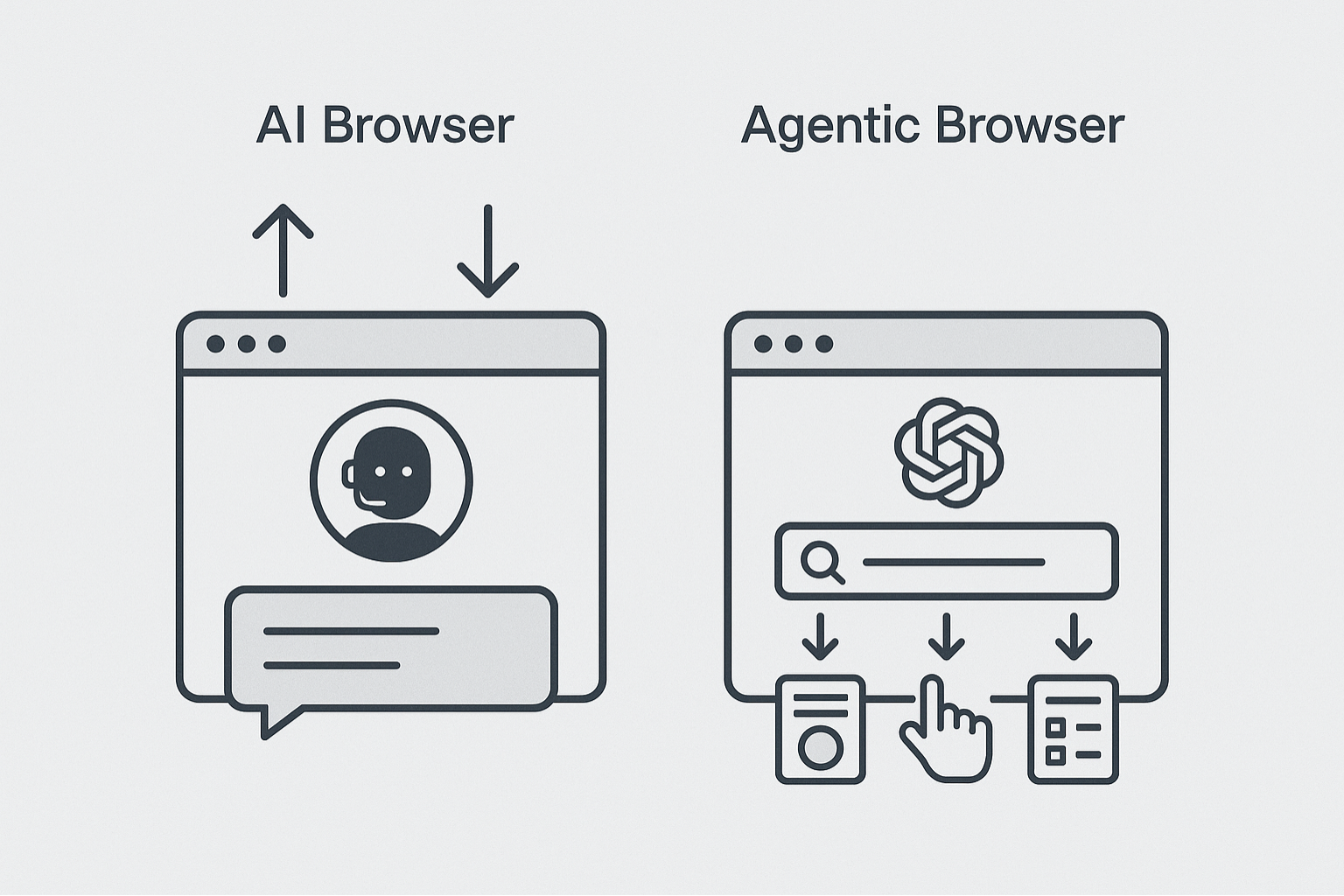
Comparative diagram showing the difference between an AI Browser (Assistant, focused on Response) and OpenAI Atlas (Agent Browser, focused on Execution).
The Architecture of "Omnipresence": How does OpenAI Atlas work?
So that the OpenAI Atlas In order to "act" autonomously, it requires a fundamentally different architecture from that of legacy browsers.
AI cannot be a simple plugin; she needs to be the core of the system. It was designed from the outset as a platform for agents, allowing a level of integration impossible to replicate simply by adding an extension to Chromium.
“"Contextual Awareness": AI that "sees" and "acts" on the screen.
The defining characteristic of OpenAI Atlas It is your "ubiquitous contextual awareness".
Unlike Copilot, which requires the user to copy and paste text or concentrate on a... sidebar, The Atlas AI model is constantly aware of the context of the active page.
This is achieved through computer vision models (similar to those powering GPT-40) that can "read" the screen., interpreting the structure of the DOM and understand the purpose of interactive elements such as buttons, form fields, and links.
When a user gives a command like “Buy this item”, Atlas isn’t just processing the language; it’s mapping that instruction to a series of UI actions: find_button('Add to Cart'), click(), find_page('Checkout'), Maps(), and so on.
The hybrid model: On-device processing vs. Cloud.
Performing such complex tasks in real time requires a delicate balance between speed and power. OpenAI Atlas It operates on a hybrid model:
Local (On-device) Processing: For immediate and privacy-sensitive actions (such as filling in a saved password or navigating between tabs), Atlas uses smaller AI models that run directly on the user's machine.
This ensures an instant response and that critical data never leaves the device.
Cloud Computing: For complex tasks that require deep reasoning (such as planning a multi-destination trip or conducting in-depth market research), Atlas leverages larger models in the cloud, such as GPT-40 or... future iterations such as GPT-5.
This hybrid architecture is essential. It allows the browser to be simultaneously fast for mundane tasks and powerful for complex automations, a significant challenge for AI infrastructure traditional.
Native integration with the OpenAI ecosystem (GPT-40, GPT-5 and Agents)
The most obvious strategic advantage of OpenAI Atlas It is to be the official "body" for OpenAI's most advanced "brains".
While competitors need to license or use APIs, Atlas has native integration.
This means that, as OpenAI's foundational models (such as GPT-40 and successors) become more powerful in reasoning, planning, and multimodality, the OpenAI Atlas instantly inherits these capabilities.
It's not just a browser; it's the primary delivery vehicle for cutting-edge AI research, transforming theoretical advances into practical automation capabilities.
OpenAI Atlas architecture flowchart showing the interaction between the user interface, the local AI agent (on device), and the AI models in the cloud (GPT 4 or GPT 5).
The New Browser Wars: Atlas vs. Google, Microsoft, and Perplexity
Both companies understood that the future lies not in assisted search, but in task execution.
O Perplexity Comet It focuses intensely on research as an "action," going beyond simply providing links to synthesize answers and perform complex research tasks.
O OpenAI Atlas It appears to have a broader ambition: not just to conduct research, but to act as a general automation agent for any web-based task, integrating directly into the OpenAI development ecosystem.
This is the battle that will define the next decade: the best response engine (Perplexity) versus the best action platform (OpenAI).
The “Architectural Debt”: Why are Google Chrome and Edge at a disadvantage?
Google and Microsoft face a profound dilemma: "architectural debt".
Their browsers, Chrome and Edge, are based on Chromium, an architecture that has been around for decades and was designed for document viewing, not AI automation.
As pointed out in technical discussions, Attaching AI to these legacy structures is like trying to transform a gasoline car into an electric vehicle by simply changing the engine. The foundation wasn't built for that.
O Google Chrome He is joining Gemini, but faces an existential challenge: Google's business model is based on clicks on ads., This is a model that the "Agent Browser" threatens to make obsolete. If the browser performs the task, the user never sees the search page.
Building from scratch, like the OpenAI Atlas This allows for the creation of a native AI architecture, optimized for contextual awareness and action execution — an advantage that may be insurmountable for incumbents.
The "Ecosystem" factor of Microsoft and Google
The advantage that the giants still possess is distribution. Google can force Chrome on all Android devices, and Microsoft can embed Edge in all Windows installations.
O OpenAI Atlas It starts with zero market share.
However, its advantage lies in its vertical integration with the AI model that defines the market.
Developers and power users They will migrate to where the most capable tool is located, and the OpenAI Atlas It is positioned to be the browser of choice for those who see AI not as a toy, but as a productive tool.
Comparative table highlighting the differences in capabilities between OpenAI Atlas (Executor Agent), Perplexity Comet (Search Agent), Google Chrome (Assistant), and Microsoft Edge (Assistant).
Practical Applications: What Can OpenAI Atlas Do for No-Code Businesses?
Leaving aside strategic theory, what is the tangible impact of OpenAI Atlas For an entrepreneur or No-Code developer? Its value lies in taking high-friction, low-value tasks (digital manual work) and automating them through natural language.
Example 1: Market Research and Lead Generation Automation
Imagine replacing hours of manual research with a single command. A founder can instruct the... OpenAI Atlas:
Prompt: “"Search the top 10 'AI for data analytics' startups on Crunchbase that have raised capital in the last 6 months.".
For each one, find the CEO on LinkedIn, the main website, and the pricing model. Consolidate everything into a table.”
Atlas would perform this multi-tab and multi-site task, delivering an actionable result. This transforms the browser into an active tool for... lead generation and market intelligence.
Example 2: Atlas as a QA (Quality Assurance) Tool for Developers
For No-Code and Low-Code developers, regression testing is a time-consuming manual process. OpenAI Atlas It can act as an automated QA tester.
Prompt: “Access the staging version of my app at https://www.flutterflow.io/. Log in with the test credentials [username/password].
Navigate to the checkout page. Try these 5 discount coupons: 'DESCONTO10', 'FRETEGRATIS', 'TESTE123', 'PROMOBUG', 'VERAO20'. Report which coupons failed and capture a screenshot of the error message.‘
This allows creators who use platforms such as FlutterFlow Validate your applications quickly and robustly, without writing a single test script.
Example 3: Data Consolidation and Automated Reporting
Managing a digital business involves monitoring multiple control panels. OpenAI Atlas This data can be consolidated.
Prompt: “"Open my Google Analytics, my dashboard Stripe and mine HubSpot CRM. Extract the total number of unique visitors, gross revenue, and the number of new MQL leads from the last week. Present a summary.”
This ability to synthesize data from multiple sources transforms the browser into a dashboard A dynamic executive, saving management time and enabling faster decisions.
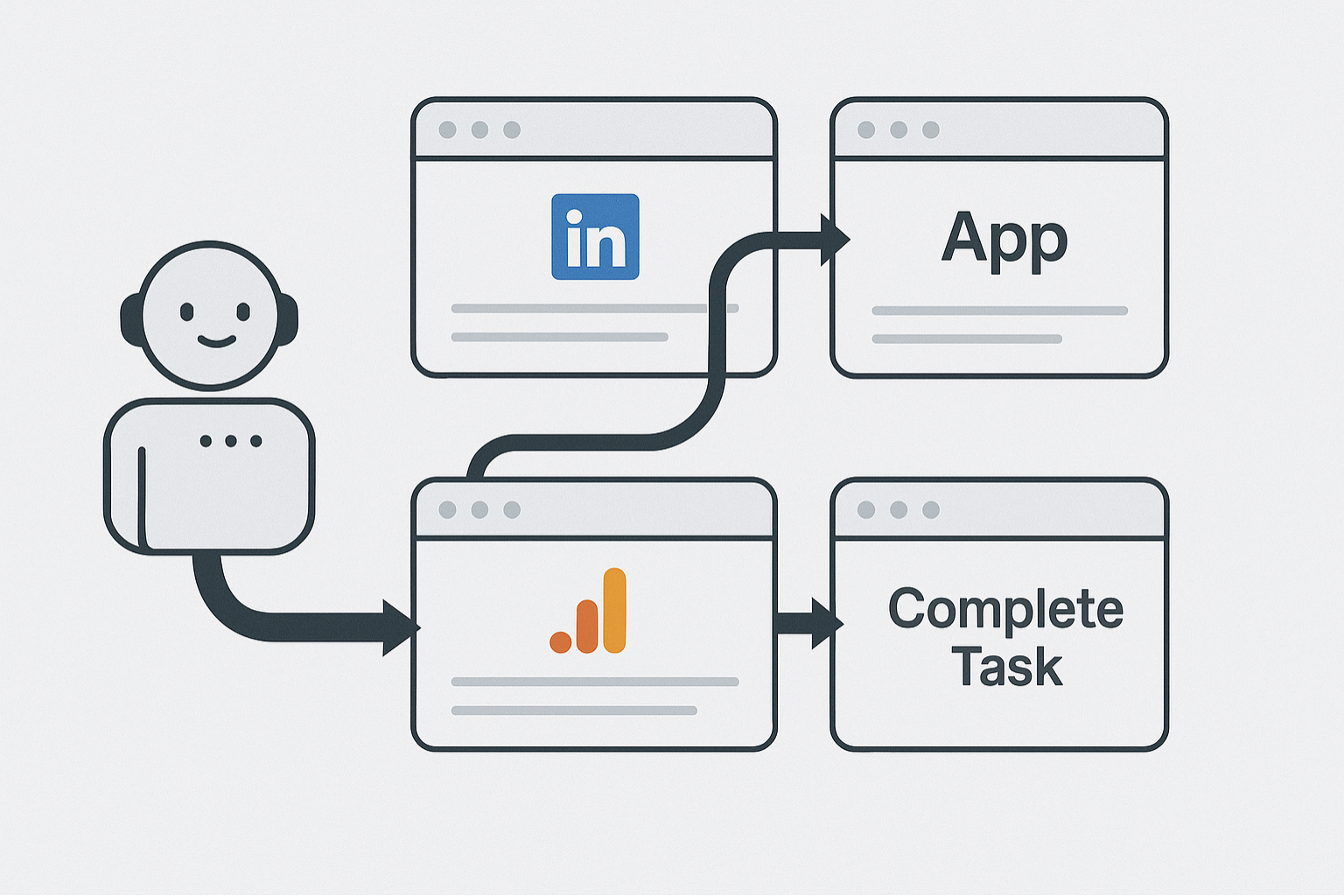
Illustration of a task automation workflow being executed by OpenAI Atlas, showing navigation between multiple tabs (LinkedIn, Google Analytics, App) to complete a task.
The End of Google Search? The Impact of OpenAI Atlas on Search and SEO
If the browser completes the entire task, the user stops to search for the intermediate links.
This is the most profound consequence of OpenAI AtlasIt threatens not only Chrome's dominance as a browser, but Google's dominance as the gateway to the internet.
The web's business model, based on traffic and advertising, is at risk.
From "Search by Links" to "Search by Execution"“
User behavior is fundamentally changing. Google has trained us to "look for links" to find information.
Tools like OpenAI Atlas Perplexity and other programs are training us to "delegate executions.".
Users no longer want the "10 blue links" to find out how to book a hotel; they want the hotel to be booked. The future of search is execution., And the browser agent is the vehicle for that.
The “Invisible Web”: Could Atlas kill blog traffic?
The debate is intense: if Atlas extracts the information, Once the data is consolidated and delivered to the user (or used to perform an action), the click on the originating website disappears.
For content creators, bloggers, and SEO-based businesses, this represents an existential crisis.
Organic traffic may drop drastically as AI agents become the primary intermediaries of information.
The web, as we know it, could become "invisible," consumed by agents instead of being read by humans.
New Opportunities: Optimizing for “Agents” (AEO)
However, where one optimization dies, another is born. The future of SEO may be... AEO (Agent Engine Optimization).
Instead of optimizing content for human reading and crawlers In terms of search, optimization will focus on making website data readable and actionable by AI agents.
Structured Data (Schema): Clear and clearly marked information (such as prices, schedules, locations) that an agent can extract without ambiguity.
Clear APIs: Allow agents to interact with your services in a programmatic and reliable way.
"Agent-Readable" content: Direct and factual texts that facilitate data extraction, instead of overly flowery prose.
Keeping up to date on these trends, such as those discussed in No-Code Start-Up Blog, This will be vital for digital survival.
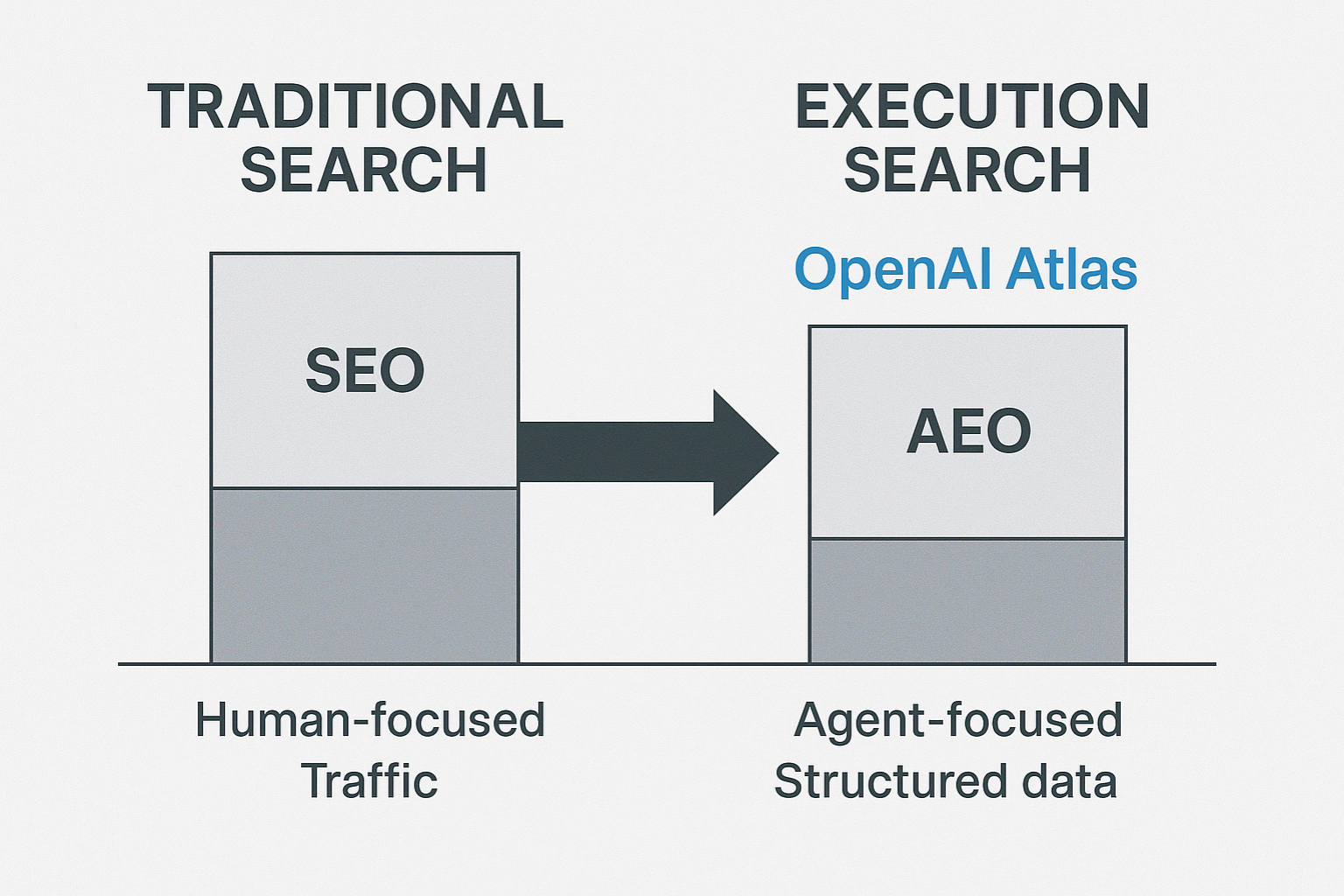
Chart showing the shift from traditional search (SEO focused on humans and traffic) to search by execution (AEO focused on agents and structured data) driven by OpenAI Atlas.
However, in the long term, the OpenAI Atlas This represents the greatest existential threat to Chrome, not only because it is a competing browser, but because it attacks Google's fundamental business model (search and advertising). Replace search with execution..
Is OpenAI Atlas free?
At the time of launch (October 2025), the OpenAI Atlas It was made available in a limited way.
It is highly likely that it will follow a model. freemium, Similar to ChatGPT, basic browsing functions will be free, but advanced "Agent" features, which consume significant computing power (like the GPT-40 or GPT-5 models), They will likely be tied to a paid subscription., such as ChatGPT Plus or a new plan focused on automation.
Do I need to know how to program to use OpenAI Atlas automation?
Absolutely not. That is the central point of the "Agent Browser" revolution. The goal of OpenAI Atlas It's about democratizing automation, allowing any user to perform complex tasks through natural language commands (prompts).
Is OpenAI Atlas safe to use with passwords and banking information?
This is the biggest barrier to mass adoption. For users to trust an agent to "log in" or "buy things," security needs to be foolproof.
O OpenAI Atlas It addresses this through its hybrid architecture: the processing on-device (local) It is used for sensitive tasks, such as password management, ensuring that critical data never leaves the user's machine.
However, OpenAI will face intense scrutiny to prove the robustness of its security before achieving widespread trust.
The Future is an Agent: Preparing for the Autonomous Web
The launch of OpenAI Atlas It's not just another product in a saturated market. It's a seismic event, a clear sign of the next era of computing.
We left the web of information (dominated by Google) for the web of assistance (the Copilot attempt) and now we officially enter the web of execution.
O OpenAI Atlas It is the first mature vehicle for this new reality.
For professionals, entrepreneurs, and developers, this change is both an opportunity and a warning.
Mastering these "agent" tools will soon be the difference between running a business manually and scaling processes intelligently.
Automation is moving away from tools that backend complex systems (like Make or Zapier) and merging with the most fundamental layer of our interaction with the internet: the browser.
The future will not be about "surfing" the web; it will be about "delegating" tasks to it.
O OpenAI Atlas It is a "Browser Agent," and the ability to create, manage, and optimize for AI agents It will undoubtedly be the most valuable skill of the next decade.
For those who wish not only to use these tools, but also to build the next generation of applications upon them, mastering the fundamentals is crucial.
O DevTools MCP It emerges to redefine AI-assisted optimization and debugging, crucial for the performance of any web application.
For those building a profitable SaaS or professionals seeking promotion, loading speed and user experience are the backbone of success, and this protocol is key to standing out in the market.
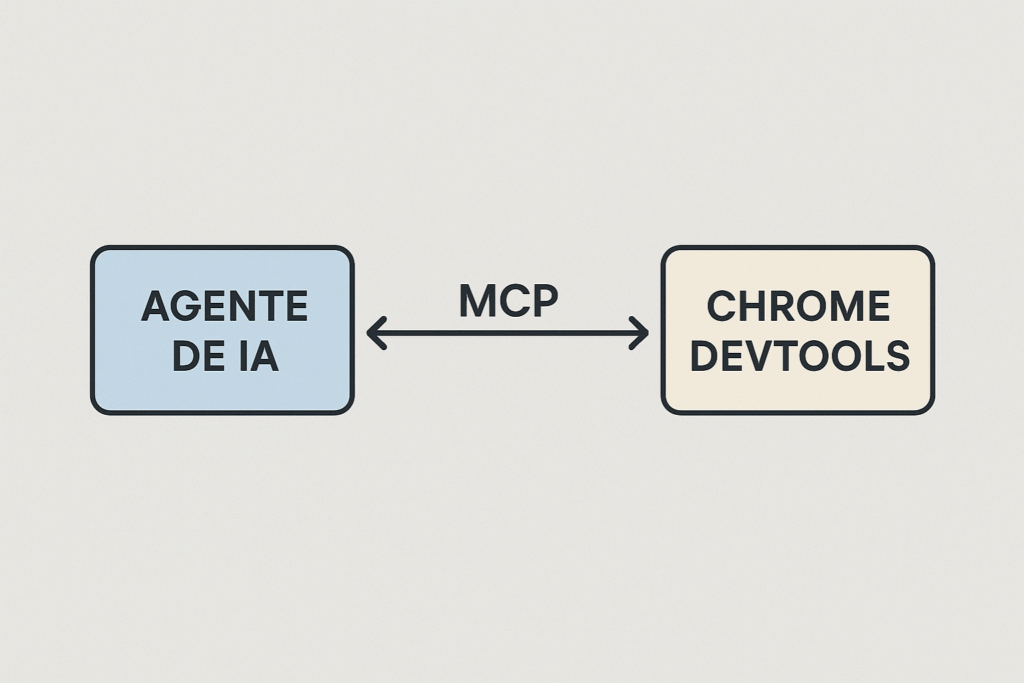
O Chrome DevTools Model Context Protocol (MCP) It is a sophisticated interface that integrates the capabilities of Chrome DevTools directly into AI Agents (LLMs).
This protocol transforms AI into a debugging assistant capable of interacting in real time with an active Chrome browser.
The result is a level of analysis, diagnosis, and correction that previously required a senior developer, making this guide essential for applying this technology to your reality.
Conceptual diagram of DevTools MCP showing the communication between an AI Agent and Chrome DevTools.
What is DevTools MCP and how does it work?
The complexity of modern web applications, even those built on No-Code platforms, demands a degree of optimization that the human eye and manual audits can hardly keep up with.
O DevTools MCP It was created to fill this gap, providing bidirectional and semantic communication between an AI Agent and the current state of a web page.
This capability is crucial for those who use visual tools, because the underlying code, although automatically generated, still needs performance validation in a real production environment.
Traditionally, troubleshooting performance or layout issues involved manually navigating through the tabs in Chrome DevTools. Elements for DOM inspection, Network for request analysis and Performance for trace.
MCP automates this inspection, allowing AI not only to access this data, but also to understand it in the context of the task.
This means that the AI Agent can identify the CSS code that causes an unwanted "layout shift" or the script that is blocking the main thread even before the end user feels the impact on navigation.
This real-time performance analysis is the differentiating factor that transforms a functional MVP into a highly competitive market product.
Model Context Protocol (MCP): The Bridge Between LLMs and the Browser
The term Model Context Protocol (MCP) refers to the standardized interface language that allows LLMs to receive, process, and send commands to Chrome DevTools, as detailed in... Official Chrome DevTools (MCP) blog for its AI agent..
It essentially translates the AI Agent's intent — such as "analyze why loading time is slow" — into specific DevTools Protocol commands, such as collecting network metrics, running a Lighthouse audit, or simulating a slow 3G connection.
This ability to translate and execute directly is what enables AI-Assisted Debugging.
The language model, instead of merely suggesting a theoretical fix, can test it in a live environment by inspecting the DOM and measuring the immediate impact.
This ensures that the proposed optimizations are not only correct, but contextually applicable to your application.
The Great Pain Point for Founders and Employees: Performance Optimization and Scalability
The founder is under constant pressure. They need to validate the product quickly and cheaply (due to financial insecurity and lack of technical skills), but the lack of performance is driving away early adopters.
A slow web app, even if built with excellence in No-Code, is a factor in its failure.
O DevTools MCP It addresses this pain point by automating optimization to ensure a professional-level experience without the need to hire an expensive front-end specialist.
It allows the Founder to build an MVP with excellent performance and achieve scale.
Similarly, professionals (struggling with difficulty applying technologies and needing promotion) who want to stand out with automations and internal applications need their solutions to be robust and fast.
An automated process that stutters or an internal control panel that loads slowly is a negative point in your evaluation.
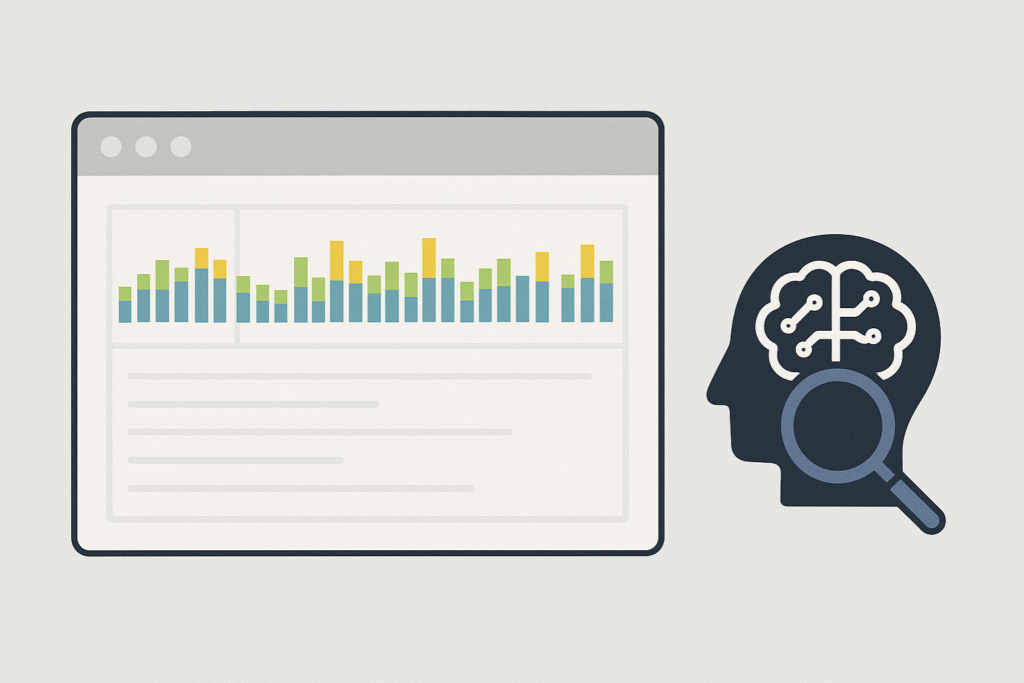
Chrome DevTools interface with the Performance dashboard being analyzed by an AI Agent.
The Architecture of DevTools MCP: Client, Server, and the Power of AI-Assisted Debugging
So that the DevTools MCP For it to work, it's necessary to understand its fundamental architecture, which is based on two primary components that interact through the already existing [unclear/unclear]. Chrome DevTools Protocol, which defines the API calls.
How an AI Agent Uses the MCP Client for Real-Time Debugging
O MCP Client It is the part that resides within the AI Agent or the LLM.
Its function is to receive a user request – such as “Find and tell me why the main image on the page is taking so long to load” – and transform it into a sequence of actionable commands that the Chrome browser can understand.
This MCP Client sends these commands to the DevTools Server via WebSocket.
The real magic of AI-Assisted Debugging happens when the Server responds. The MCP Client receives not only raw data (such as network logs), but a context rich. The LLM uses this context to:
Diagnose: Identify the problem (e.g., the image has an excessive file size).
Suggest the correction: Suggest a change (e.g., "reduce the image to 500kb and use the WebP format").
To check: Re-run the performance audit to confirm that the correction had the desired effect, validating the real-time optimization cycle, according to studies on... AI-Assisted Debugging with Performance Insights.
Setting up the DevTools Server: The First Step Towards Automation
O DevTools Server It is the Chrome browser instance (or an environment). headless (such as Puppeteer) which exposes the DevTools Protocol to be accessed.
Setting up this DevTools Server is relatively simple and, in the context of DevTools MCP, This is the point of contact that allows AI to take control of the inspection.
Many implementations of Coding Agents, such as those available in The official Chrome DevTools MCP repository on GitHub., These solutions already include the DevTools Server setup as part of their basic infrastructure, making life easier for the No-Code user.
By configuring the DevTools Server, you are, in effect, granting your AI the ability to see and interact with your application exactly as a human user would, but with the precision of an expert.
It is essential for anyone dealing with AI infrastructure and seeks to automate complex maintenance tasks, transforming the AI Agent into a true technical assistant.
How to use DevTools MCP to optimize Core Web Vitals: Advanced Diagnostics with DevTools MCP
Core Web Vitals (CWV) optimization has become an indispensable ranking factor for Google, with LCP (Largest Contentful Paint) being a critical metric for speed perception.
Ignoring CWVs, especially LCP, is the same as leaving money on the table for the Founder and the same as losing relevance in deliverables for the professional.
O DevTools MCP It offers a powerful, automated way to master these metrics, aligned with Google's quality guidelines. Core Web Vitals.
Auditing the LCP (Largest Contentful Paint) and Other Critical Metrics
One of the most valuable applications of Chrome DevTools MCP It is the ability to perform complete Lighthouse and Core Web Vitals audits and analyze the results at a semantic level.
Instead of simply presenting a score, AI can identify the element that is the LCP, analyze the chain of dependencies that delay it, and suggest exactly how it should be optimized.
For example, an AI Agent using MCP can diagnose that a delay in LCP is not caused by an external resource, but rather by a CSS block that is blocking rendering.
It can then, through AI-Assisted DOM Inspection, suggest prioritization. inline This critical CSS is used to verify improvements in real time, providing the No-Code user with a ready-to-apply solution.
AI-Assisted DOM Inspection: Solving Complex Layout Problems
AI-Assisted DOM Inspection is the feature that allows AI to not only see the page structure, but also understand the geometry and positioning of elements.
Monitor the Layout: Observe the DOM Inspection during loading.
Identify Changes: To detect which element caused the shift (the visual change).
Suggest a Correction: Suggest including fixed dimensions or reserving space (placeholder) for the late loading element, correcting the CLS.
This level of granularity and the ability to simulate end-user behavior, all in an automated way, is what positions the domain of DevTools MCP as a highly valued skill in the market.
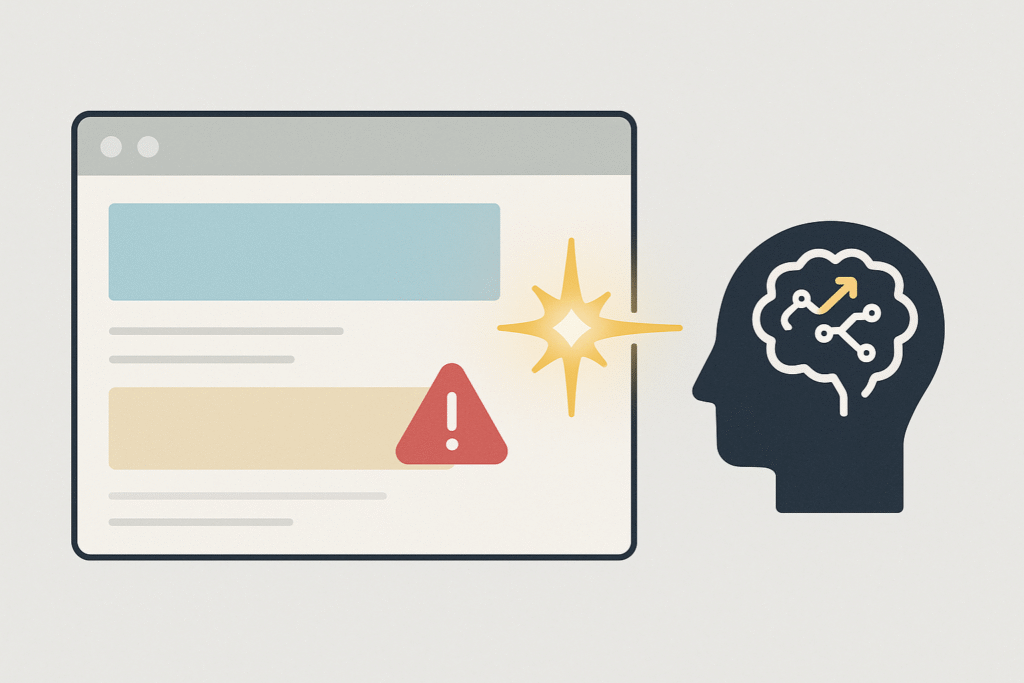
An AI Agent (LLM) correcting a layout or Core Web Vital error in real time, symbolizing AI-Assisted Debugging.
DevTools MCP vs. Playwright MCP: Which one to choose?
When exploring the ecosystem of coding and automation agents, you may encounter other protocols with the acronym MCP (such as Playwright MCP), which can be confusing.
It is crucial to understand that, although both use the concept of Model Context, they have fundamentally different focuses in the development cycle.
It's important to note, to avoid common confusion, that the acronym MCP (Microsoft Certified Professional) refers to a completely distinct certification within the Microsoft ecosystem, with Focus on career development and IT., unrelated to Chrome DevTools.
Focus on Deep Analysis vs. Automated Functional Testing
O Chrome DevTools MCP It is, above all, a tool of diagnosis and optimization. Their focus is on:
Semantic Debugging: Allowing AI to understand why The code is slow or broken, based on detailed data from Chrome DevTools.
Quality Improvement: Focus on optimizing metrics such as LCP and FCP (First Contentful Paint).
Already the Playwright MCP (focused on Playwright) tends to be a solution primarily aimed at automated functional tests.
Its main focus is to emulate user interactions, ensuring that the workflow (such as login, registration, form filling) functions as expected across different browsers, with an emphasis on stability and test coverage.
When to Use Each Protocol in Your Development Strategy
Use DevTools MCP: Whenever your priority is to speed, resource optimization and technical excellence.
It's the ideal tool for the Founder who needs their SaaS to be profitable. fast to retain clients, and for the CLT (Consolidation of Labor Laws) employee who needs to prove the efficiency of its internal application.
Use Testing Solutions (such as Playwright): Whenever your priority is to reliability of the user flow and the browser compatibility.
When working with No-Code solutions, you can (and should) use both approaches.
First, use the DevTools MCP to ensure that your application's baseline performance is top-notch.
Next, use functional testing tools to automate the verification that all user interactions work correctly.
Visual representation of a No Code application being debugged by AI, highlighting the loading speed.
The Path to High Performance: MCP DevTools Integrated with the Future of No-Code
The adoption of AI Agents and DevTools MCP This does not mean the end of technical knowledge, but rather a raising of the level of demand.
With repetitive debugging and auditing tasks automated, the No-Code professional (whether a Beginner Generalist, Founder, or Freelancer) can focus on what really matters: the solution to the business problem and the strategic architecture of the product..
Leveraging Solutions like FlutterFlow with Intelligent Debugging
High-performance No-Code platforms, such as FlutterFlow, generate clean code, but optimizing delivery and browser context remains a challenge.
The use of DevTools MCP This is especially relevant here because it allows the performance of mobile and web applications (built on FlutterFlow) to be audited with the same depth as Chrome DevTools, enhancing our learning process. FlutterFlow Course.
An AI Agent with MCP can simulate loading on a mobile device with a slow 4G connection and suggest asset loading optimizations or the use of web workers to maintain a fluid interface.
This transforms performance optimization from a manual trial-and-error task into a scientific, AI-assisted process.
The Next Step: Integrating the AI Coding Training from No Code Startup
To thoroughly understand the philosophy behind DevTools MCP And with other tools that integrate artificial intelligence into the development process, it is essential to seek an education that combines expertise in AI with the practicality of Low-Code.
The Model Context Protocol is a clear example of how AI can interact with complex environments, requiring professionals to have the necessary knowledge base to architect and manage these AI Agents.
THE AI Coding Training The No Code Startup focuses precisely on preparing professionals to work in this new scenario, where creating softwares is not just about dragging and dropping, but about commanding AI Agents with technical precision to guarantee high-performance and scalable products.
This is the future of development: where AI is the engine and its knowledge is the map.
An icon representing the domain of web optimization and performance.
FAQ: Frequently Asked Questions
What is the Model Context Protocol (MCP) and how does it apply to Chrome DevTools?
The Model Context Protocol (MCP) is a communication standard that allows Large Language Models (LLMs) to interact directly with Chrome DevTools.
It serves as a translator, transforming the AI Agent's instructions and questions about performance or layout into DevTools protocol commands, enabling real-time AI-assisted debugging.
How can an AI Agent use Chrome DevTools MCP for real-time code debugging?
The AI Agent acts as an MCP Client, sending requests to the DevTools Server.
He can ask the server to run a Lighthouse Audit, inspect a specific element, or monitor CPU usage.
The context-rich response allows the AI to diagnose the problem (e.g., render blocking resourceSuggest a fix and check if the solution worked, all in a matter of seconds.
What specific tasks does DevTools MCP allow you to automate, such as performance audits or DOM inspection?
DevTools MCP enables the automation of various technical tasks. This includes complete Lighthouse audits to verify accessibility and performance.
It also performs Real-Time Performance Analysis to identify network or JavaScript bottlenecks.
Furthermore, AI-assisted DOM Inspection can diagnose layout problems (such as CLS), and the protocol even allows for the simulation of different network conditions to optimize loading.
What are the main differences between Chrome DevTools MCP and Playwright MCP?
The Chrome DevTools MCP is focused on diagnosis, optimization, and deep technical debugging, using the capabilities of Chrome DevTools to analyze performance.
Playwright MCP, on the other hand, focuses more on Functional testing and user flow automation Across multiple browsers, ensuring interactions function as expected, with an emphasis on stability.
How can I use DevTools MCP to diagnose and fix complex layout problems?
The protocol allows the AI Agent to monitor the style and geometry properties of the elements.
If a layout problem (such as CLS, Cumulative Layout ShiftIf detected, AI-Assisted DOM Inspection can isolate the problematic element, identify the lack of space reservation, and suggest adding fixed dimensions to the code, automatically correcting the visual stability issue.
Visualization of the No Code Startup ecosystem, focusing on high performance and strategic solutions.
Alternative text: Visualization of the No-Code Start Up ecosystem, focusing on high performance and strategic solutions. The performance optimization revolution is no longer restricted to elite developers.
With the emergence of protocols such as DevTools MCP, The barrier to entry for technical excellence has been broken down.
He indicates that the future lies in the synergy between the AI Agent and specialized knowledge.
Mastering the art of managing this intelligence is what will set successful builders apart.
Hey everyone! Native LLM, multi-agent architecture, orchestration, coupled browser, and voice prompt. These are the big new features of Cursor 2.0.
Nice to meet you, I'm Anderson Brandão, and I'll be here with you on... NoCode Startup Speaking of VibeCode and related development topics. Cursor 2.0, the tool most used by us VibeCoders, has brought incredible updates.
I hope you enjoy it and learn along with me everything this new version has to offer!
Contents
New features of Cursor 2.0 and overview of the tool.
Right off the bat, we noticed that the Cursor now has two display options: the "Agents" tab and the "Editor" tab.
The "Editor" tab is the traditional view of the Cursor, which is basically a fork From VSCode, with our file area, terminal, and chat with the agent. But this chat, until then, was done in a linear way. Remember that word: linear.
In the previous version, you sent a prompt, It would receive the response, analyze it, send another prompt, and so on. This is where one of the biggest changes lies.
Multi-agent architecture and new possibilities
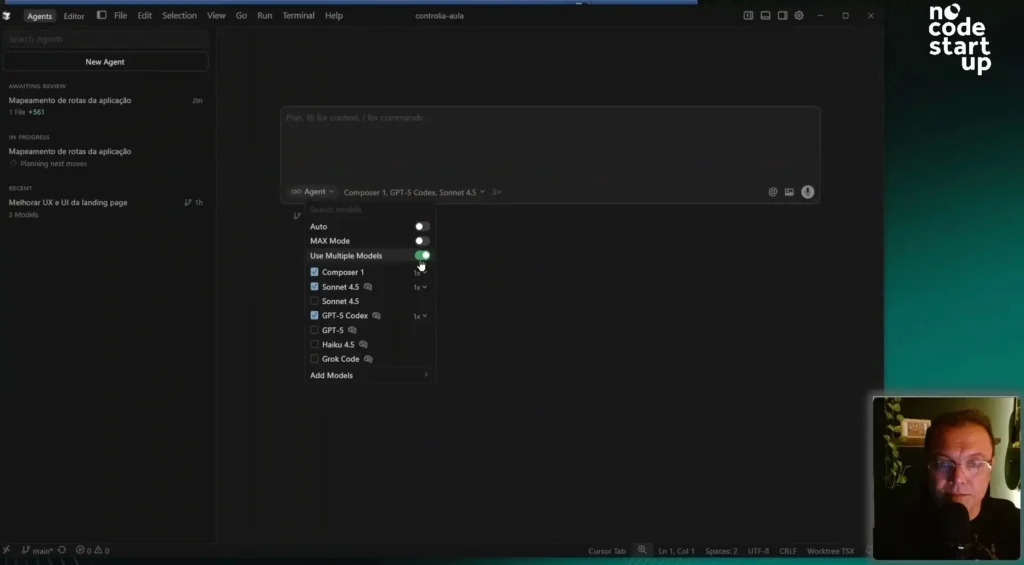
In the new "Agents" tab, Cursor introduces a new architecture, enabling work with multiple agents.
Here in the left sidebar, you'll find our multiple agents, and you'll be able to work with up to eight of them simultaneously. That's a major game-changer.
Where will this be useful? In medium and large-scale applications, where we have well-defined modules. You can have one agent working on one module and another agent on another, in parallel.
To test if it's really as fast as they say, I did a practical test. I got a prompt asking to map the application and create an MD file of routes.
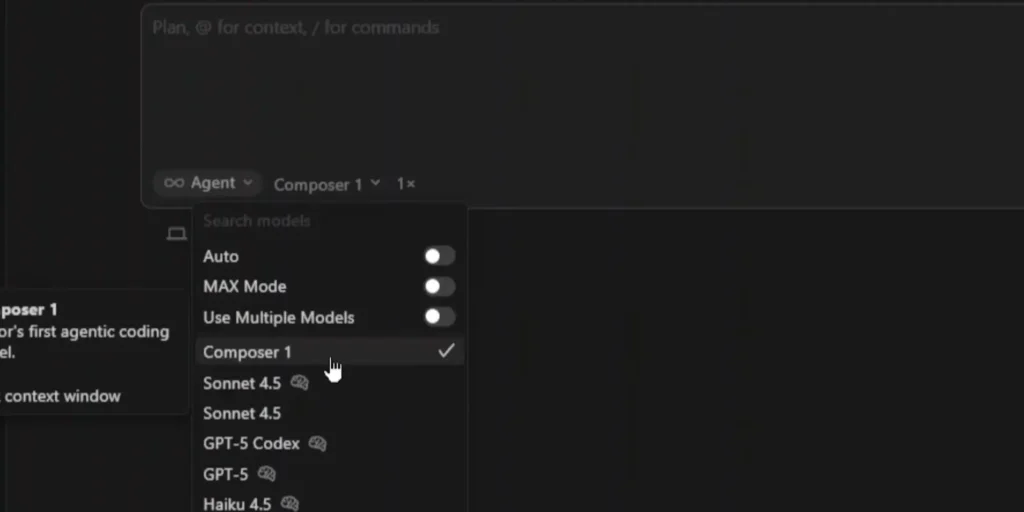
First, I passed the prompt to the GPT-5 Codex and waited a few seconds. Then, I opened a new agent, pasted the same I pressed the prompt and selected Composer 1.
The result? While I was speaking, Composer was already "going full steam ahead." It finished the routes.MD file with impressive speed. Meanwhile, the GPT Codex was still reading the files and planning the next steps.
Although I think Composer may not have the same ability to solve complex problems as more established LLMs like Claude or GPT Codex, its speed is a key advantage. I'll venture to say that I'll use Composer a lot for tasks that don't require much complexity.
Practical tests with multiple models (Composer, Sonnet and GPT-5 Codecs)
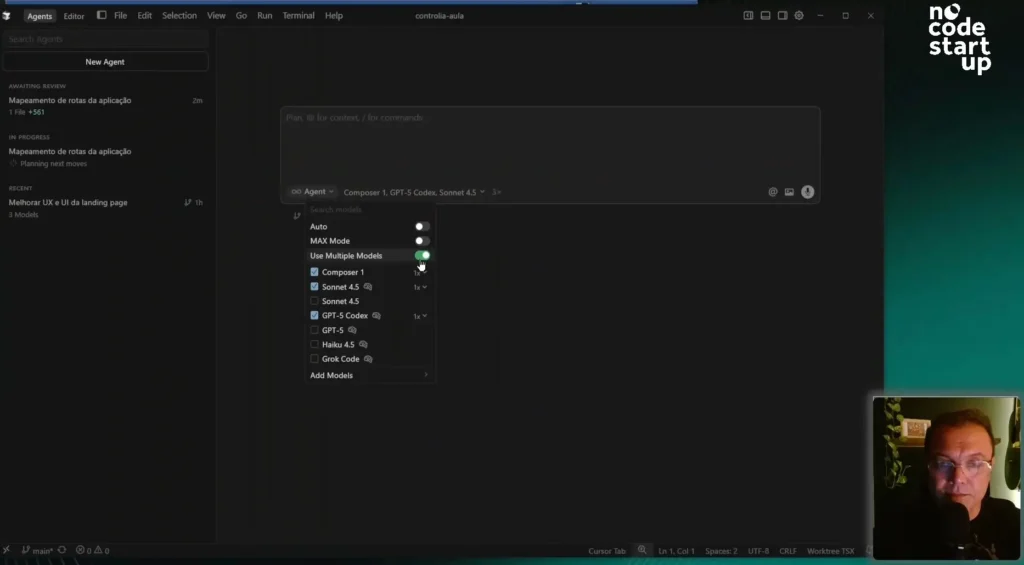
Now, I want to show you another feature: using multiple models to run the... same task.
To do this, I configured an agent by selecting three LLMs at the same time: Composer, Sonnet 4.5, and GPT Codex.
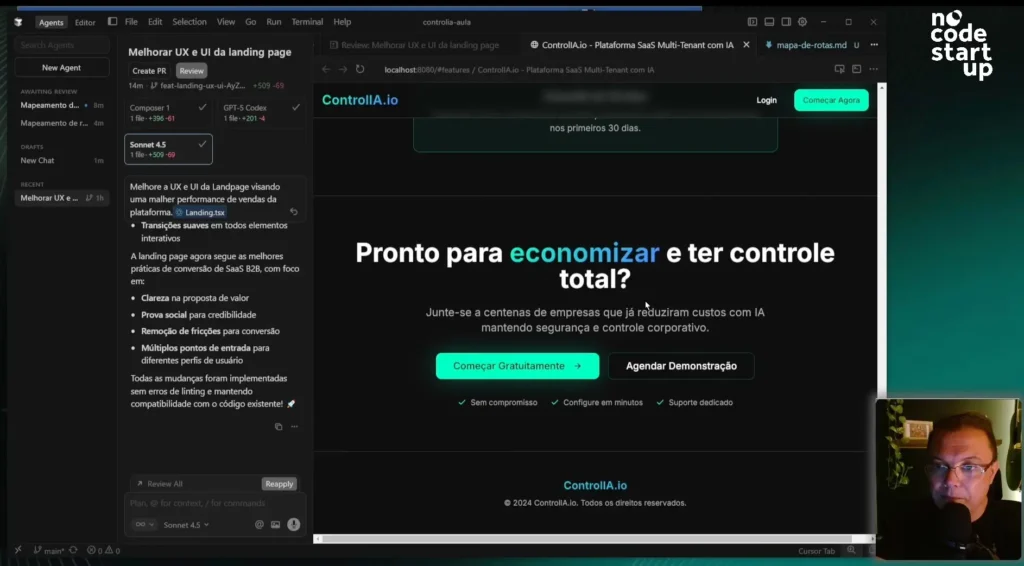
The prompt I gave to the three of them was: "improve the UX and UI of the landing page to get better sales results," referencing a file from my project.
This is excellent for running tests and seeing which LLM performs best for each type of task.
Comparison of results between LLMs
To analyze the responses, I used another new feature: the "Browser Tab," a browser attached directly to the cursor.
First, I saw the result from Composer 1. I used "Apply" and "full overwrite". Honestly, it didn't change much. For layout and UX/UI, I wouldn't use Composer anymore.
Then, I applied the results from the GPT-5 Codex. It's already changed quite a bit, adding more cards, more features, social proof, and even a FAQ. I liked the approach.
Finally, I applied the SONET 4.5 test. And, in my opinion, SONET won.
Right off the bat, he presented a call to action much more aligned with my sales pitch: "Reduce up to 70% of your AI costs while maintaining total control." He added a cost comparison (with and without the tool), social proof, and an already open FAQ. Fantastic!
I ran the same prompt through three tools and was able to choose which one to apply. In this case, I chose the... SONET 4.5.
Visual testing and interaction with the console.
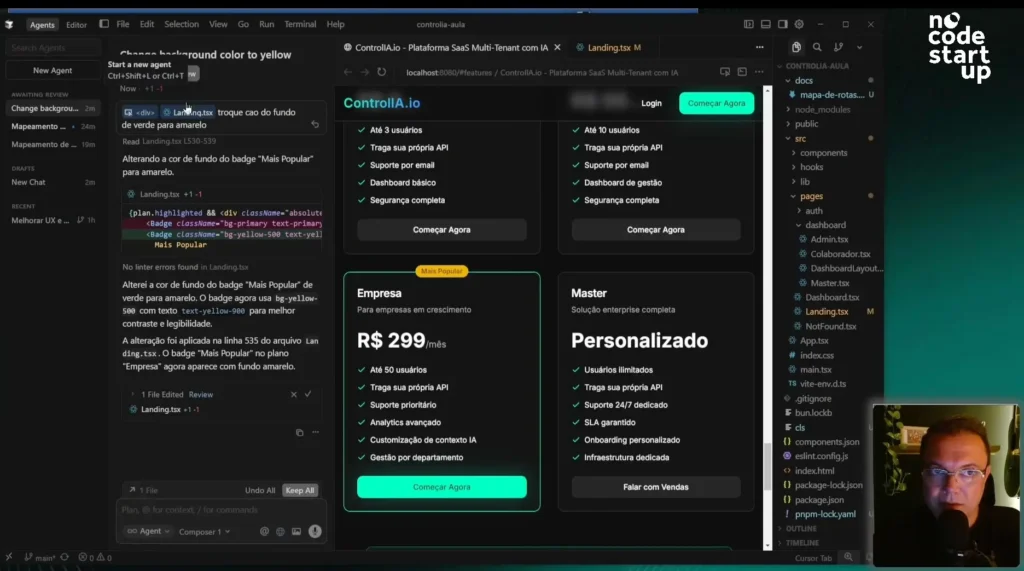
Speaking of the "Browser Tab," it has other very useful controls, such as the option to activate the console and the "Select Element" function.
This "Select Element" function is amazing. You can click on an icon, visually select an element on the page (like a div), and it automatically comes to your prompt.
I tested it: I selected a div and asked, "change the background color from green to yellow." It knew exactly which object it was.
This feature is extremely useful, especially for those who don't have much coding knowledge, as it eliminates the need to worry about finding the exact object on the page.
Voice prompt and final analysis of functionalities.
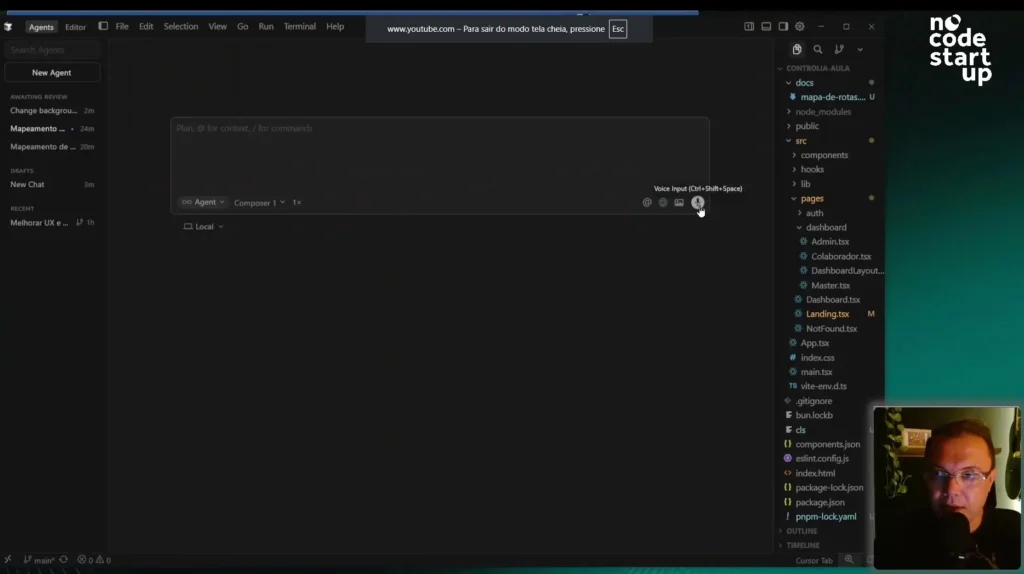
Finally, we have the microphone, which is the voice prompt.
I sent an audio message in Portuguese: "Analyze the landing page and suggest UX and UI improvements.".
What did he do? He transcribed my audio and immediately translated the prompt into English. This is an important point: LLMs still have a preference for understanding the context of the prompt in English.
With that, we've covered all the fantastic new features of Cursor 2.0. If you found this content relevant, please like and subscribe to the channel to join the largest VibeCode community in Brazil.
Here's an invitation for you to delve even deeper:











 EN
EN  PT
PT  ES
ES