ASSINATURA PRO COM DESCONTO

Hours
Minutes
Seconds

Leonardo AI in 2025: How to create amazing images (step-by-step + prompts)

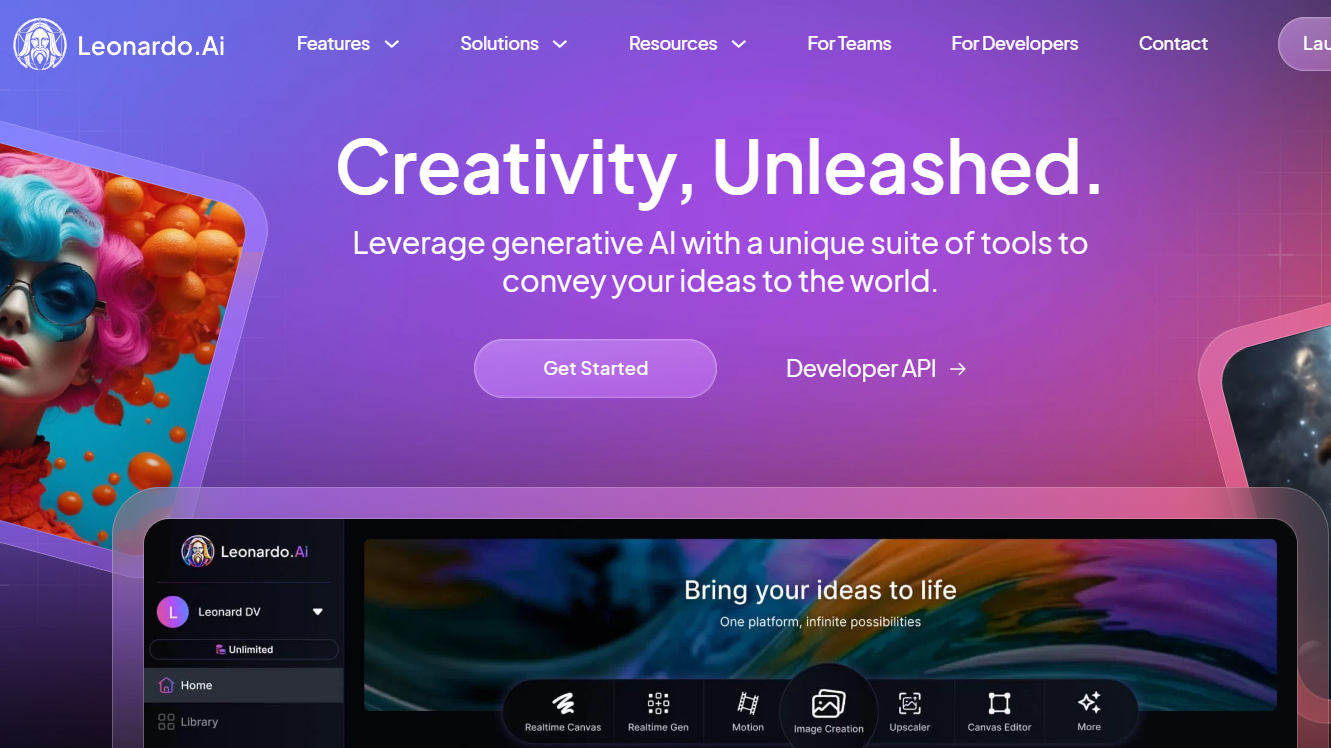
leonardo ai 01
leonardo ai 02

Simple navigation and flexibility for different styles

Leonardo AI is simple to use: you write a short text (prompt), click on To generate and choose the best option. It's possible. change the style (realistic, cartoon, minimalist) depending on the project, useful for marketing, entertainment and illustration.

You can use together no-code tools (e.g.: FlutterFlow, WeWeb, Bubble): Generate the image, download and import it. In your app/website. Everything. without having to program.

Leonardo AI exclusive features

Leonardo IA uses sophisticated algorithms that interpret user instructions to produce customized images with a high level of detail.

It processes data quickly, resulting in a fluid user experience with fast and accurate responses. You can create variations, improve quality (upscale) and adjust details before downloading.

In practice, the flow is fast, but It's not live streaming.You generate, you see. several options and choose the best one. Tip: save style presets to maintain the same aesthetic in covers, icons and thumbnails.

Furthermore, the platform also benefits from a solid foundation in Bubble Community, where users share tips and tricks.

images created in real time with Leonardo Ia
Prompt: a photorealistic image of a human hand interacting with a modern smartphone, colorful holographic UI elements floating above the screen, futuristic digital interface with translucent icons, vivid pink and purple app tiles hovering mid-air, dark tech background with hexagonal grid glowing slightly, immersive augmented reality feel, highly detailed hand texture, {futuristic mobile UX concept}, inspired by cyberpunk interfaces, volumetric lighting, depth of field, realistic shadows and light reflections on glass, 4k resolution, captured with a macro lens, cinematic shot, ray tracing

Customization and template library

The power of Leonardo IA is also revealed in its customization options, which allow the user to adjust the visual style according to the project's demands. This functionality is especially useful for designers working in various media types, as it enables a high level of creative control.

Thus, Leonardo IA also offers an extensive library of models and visual references that can be explored and adapted, facilitating the development of unique and innovative projects.

You can define a style (e.g., “flat purple illustration”) and repeat in all the pieces of the project. Use the library as reference, manage 4–8 options and finish with quality improvement before downloading.

Expansion with integrations and courses

He wants automateTools such as make up or n8n they can receive a form, generate the image and send by email/WhatsApp. To learn, prioritize courses automation/AI (Make, n8n, Dify) are best suited for this use.

This allows professionals from different fields, even those without advanced design or technology skills, to take full advantage of the software's capabilities.

This ecosystem of integrations makes Leonardo IA a versatile and adaptable option for users of various experience levels.

The advantages of Leonardo AI for professionals and enthusiasts
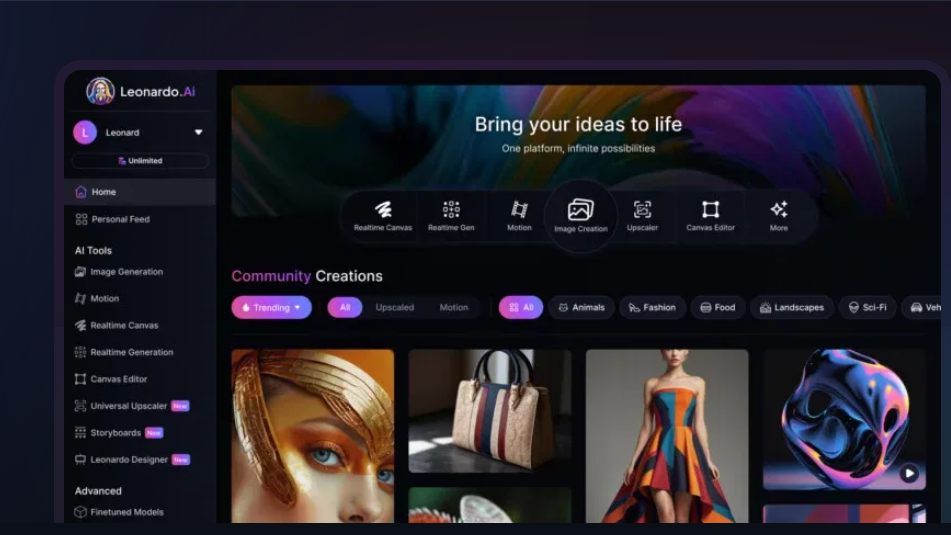
Leonardo, learn how to create your own images for free.

Advantages of Leonardo AI (in a short time and without knowing how to program)

  • Easy to use. Write a short text (prompt), click on To generate, Choose the best image and download.
  • Adjustable quality. Generate variations and use Improve quality (upscale) before exporting.
  • Consistent style. Save one preset (e.g., "flat purple illustration") and repeat on covers, icons, and thumbnails.
  • Quick for campaigns. In minutes you can create pieces for posts, ads and apps.
  • It works with no-code. Gere no Leonardo e import the image in FlutterFlow, WebWeb or Bubble as an asset.

Tip: Test 3 versions of the same prompt and choose the one that best matches your color palette.

Quality finish and precise details

Precision in details is also a differential that pleases visual artists and creators who value the finish and final quality of their productions. Thus, the presence of the tool in flutterflow course helps attract beginners and professionals interested in improving their AI skills.

Security and protection of user data

In addition to creating quality images, Leonardo AI provides an additional layer of security for users, protecting data and creations with advanced protocols. This feature is essential in a digital environment where privacy and information protection are growing concerns.

Thus, the reliability of the platform makes it a robust and secure option for professionals who need a complete solution for their digital creations. Therefore, Leonardo AI stands out even more for these guarantees, positioning itself as a reliable tool in the image creation sector.

Use the account company staff and download Keep your files safe and secure. Avoid sensitive data no prompt and, in critical projects, Review the privacy policy. from the platform.

Ease of use for all levels

Leonardo IA's ease of use allows even beginners to have a satisfactory experience from the start. The learning curve is low, and the features are organized logically.

This makes it easy to access essential features. In this way, it allows new users to quickly discover the potential of the software, whether for personal or professional projects.

  • Open Generate → choose one model.
  • Write one short prompt (subject + style) → To generate.
  • Choice the best image → Improve qualityTo go down.

Expanding creative potential with communities and free courses

Use Leonardo to create assets and import in your favorite builder. To evolve, participate in the community and follow step-by-step tutorials (e.g., create cover, icon, and thumbnail) with the same style).

Integration with platforms such as Free bubble course further expands creative potential, allowing users of different levels to explore innovative features, offering a safe, collaborative and easy-to-use development environment.

Leonardo AI and the future of AI imaging

image creation with leonardo ia
Prompt: a photorealistic image of a female digital artist using a tablet at a desk, surrounded by indoor plants, a colorful 2D cartoon creature with big eyes and a small guitar emerging from the tablet screen, surrounded by vibrant butterflies in blue, yellow and purple, blending real world with digital fantasy, {augmented reality drawing scene}, cute animated forest creature, bright cheerful colors, clean background, inspired by Studio Ghibli and Pixar concept art, soft lighting, shallow depth of field, 8k resolution, shot with a Canon EOS, bokeh effect

Artificial intelligence technology has transformed the way images are created, and Leonardo AI exemplifies this evolution to the fullest. Using AI in the creative process enables a new approach to digital art, making it easier to create complex visuals in less time and with a touch of personalization.

Therefore, Leonardo AI contributes to this transformation, making the creation process more accessible and efficient. Partnerships and integrations, such as the one with Make Integromat, increase the value of the software by expanding what can be done in terms of automation.

Leonardo AI and its impact

Example of an image created using Leonardo IA.
Previous image recreated

Where is this going? (what to expect in the short term)

  • The flow is getting faster and faster. The generation continues fast, but It's not live/streaming.You ask, receive options, and choose the best one.
  • More tools in one place. Tendency to have variations, upscaler and short animation (image-to-video) in the same panel.
  • Use with no-code. The daily practice is: generate in Leonardo and automate sending (email/WhatsApp) with make up or n8n.
  • Basic care. Avoid sensitive data in prompt and save the files in your own/company account.

Example of a quick impact: generate 3 thumbnails For YouTube, choose 1, do upscale and publish — all in under 10 minutes.

Therefore, by integrating with automation tools and no-code platforms, Leonardo AI enables an increasing number of people to take advantage of advanced AI capabilities. And all without the need for technical knowledge.

Thus, democratizing access to sophisticated technologies, making digital creation a more inclusive and collaborative process. Something crucial in a world of constant innovation.

In conclusion, Leonardo AI stands out as one of the best tools for creating images with artificial intelligence, serving professionals and amateurs who want an efficient and intuitive platform. Its integration with platforms such as best AI tools ensures that Leonardo AI continues to evolve and remain relevant in the competitive AI market.

With a suite of features designed to facilitate creative work and a solid user base, the Leonardo IA is more than just a software: it is a complete solution for those who want to explore new frontiers in digital imaging.

Want to learn more about the world of AI without needing to know how to program? Come be a part of NoCodeIA Training!

FAQ – Frequently Asked Questions from Users

Is Leonardo AI free?

Yes. Leonardo AI has a free plan with a daily token quota for generating images and using Canva; it doesn't expire. Paid plans increase limits, unlock extra features (such as private creations), and provide more "fast tokens".

How can I use Leonardo AI for free?

Create an account at leonardo.ai and use the Free plan, This service grants a daily allowance (e.g., ~150 fast tokens/day) for generating images and performing actions in Canvas. When the allowance runs out, it renews the following day; higher resources and limits require a subscription.

How do I fix images using Leonardo AI?

Use the Canvas EditorSend the image and apply. Inpainting to repair/touch up areas, Outpainting To enlarge the scene and adjust the editing intensity. To improve quality, use the Upscaler (Alchemy/Ultra). For background, use Remove Background or Transparency/PNG when you need a clean cut.
org

Sign up for Free N8N course

The most comprehensive free N8N course you will ever take. Learn how to create your first AI Agent and automation from scratch.

Neto Camarano

Neto specialized in Bubble due to the need to create technologies quickly and cheaply for his startup, and since then he has been creating systems and automations with AI. At the Bubble Developer Summit 2023, he was listed as one of the world's leading Bubble mentors. In December, he was named the top member of the global NoCode community at the NoCode Awards 2023 and won first place in the best app competition organized by Bubble itself. Today, Neto focuses on creating AI Agent solutions and automations using N8N and OpenAI.

Also visit our Youtube channel

Learn how to create AI Applications, Agents and Automations without having to code

More Articles from No-Code Start-Up:

Straight talk: 2026 will be a game-changer for those who want to make money with... AI (Artificial Intelligence).
Opportunities exist, but not all are worth your time, and some promise much more than they deliver.

In this article, I've organized the main ways to monetize AI into clear categories, with pros, cons, and the actual level of effort involved.
The idea here is to help you choose a conscious path, without falling into illusory shortcuts.

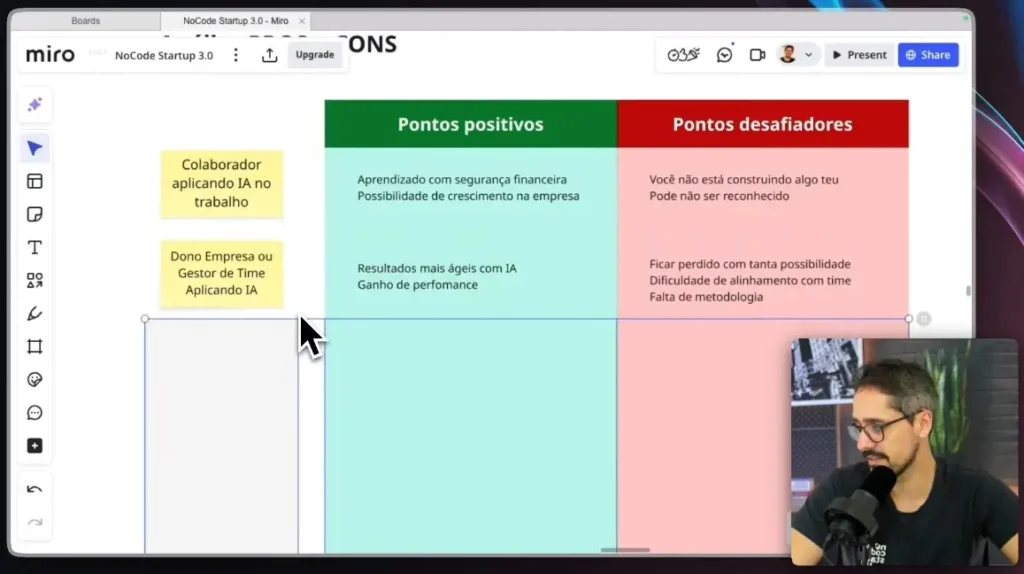
AI applied to the workplace as an employee (career and security)

If you already work for a company, applying AI to your daily routine is one of the safest ways to start.
You learn, experiment, and build real projects without sacrificing financial stability.

It's possible to create internal automations, agents, and even softwares that increase efficiency, reduce costs, and generate a direct impact on the business.
When that happens, recognition tends to follow — provided you generate real results, and not just "use AI for the sake of using it".

AI applied to the workplace as an employee (career and security)

The key point to understand is that you are not building something that is your own.
Even so, for learning and professional growth, this is one of the best entry points.

AI for managers and business owners

AI for managers and business owners

For managers and business owners, AI perhaps represents the biggest financial opportunity of 2026.
Most companies are still lost, lacking method, strategy, and clarity on how to apply AI to their processes.

When applied correctly, AI improves performance, reduces bottlenecks, and accelerates results in sales, customer service, and operations.
The challenge lies in the excess of tools and the lack of a clear methodology for the team.

Whoever manages to organize this chaos and apply AI with a focus on results will capture a lot of value.
There's a lot of money on the table here, really.

AI-powered service delivery: an overview

AI-powered service delivery: an overview.

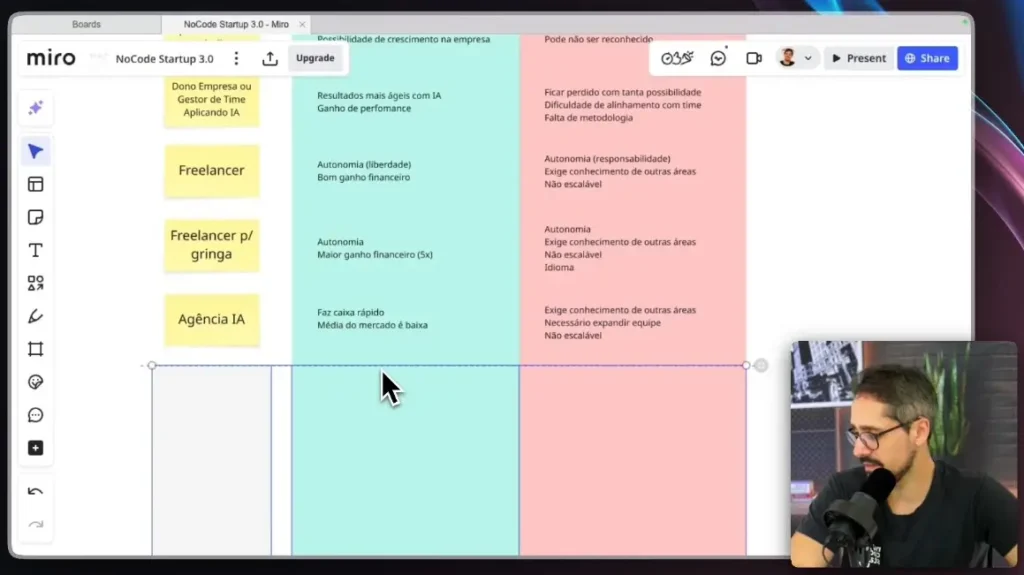
THE AI-powered service provision It's one of the fastest ways to generate income.
You solve real business problems using automation, agents, and intelligent systems.

This model unfolds into freelancer, freelancer for international clients, agency, and consultancy.
Each one has a different level of effort, return, and complexity, but all require execution.

This is where many people really start to "make the wheels turn.".

Freelancer working abroad (earning in dollars)

Freelancer working abroad (earning in dollars)

Freelancing for international companies is, without exaggeration, one of the best options for making money with AI.
Earning in dollars or euros completely changes the game.

You're still trading time for money, but with a much greater return.
The biggest challenge is the beginning: getting the first project and dealing with the language, even at a basic level.

After the first client arrives, referrals start to come in.
For those who want quick results and are willing to sell their own service, this path is extremely compelling.

Creating an AI agency

Creating an AI agency

AI agencies are the natural evolution of freelancing.
Here, you scale people, projects, and revenue.

The market is still immature; many people do everything wrong, and this creates opportunities for those who do the basics well.
You can close deals, build teams, and deliver complete solutions with AI.

The challenge then becomes management: people, deadlines, processes, and quality.
Even so, by 2026, it's one of the fastest ways to consistently monetize AI.

👉 Join the AI Coding Training Learn how to create complete prompts, automations, and AI-powered applications—going from scratch to real-world projects in just a few days.

AI consulting for businesses

AI consulting for businesses

Consulting is an extremely lucrative model, but It's not a starting point..
It requires practical experience, process understanding, and diagnostic skills.

The financial return is usually high relative to the time invested.
On the other hand, you need to have authority, a track record, and a real portfolio of projects.

For those who have experience in agencies, product development, or large-scale implementations, this is an excellent career path.
For beginners, it doesn't make sense yet.

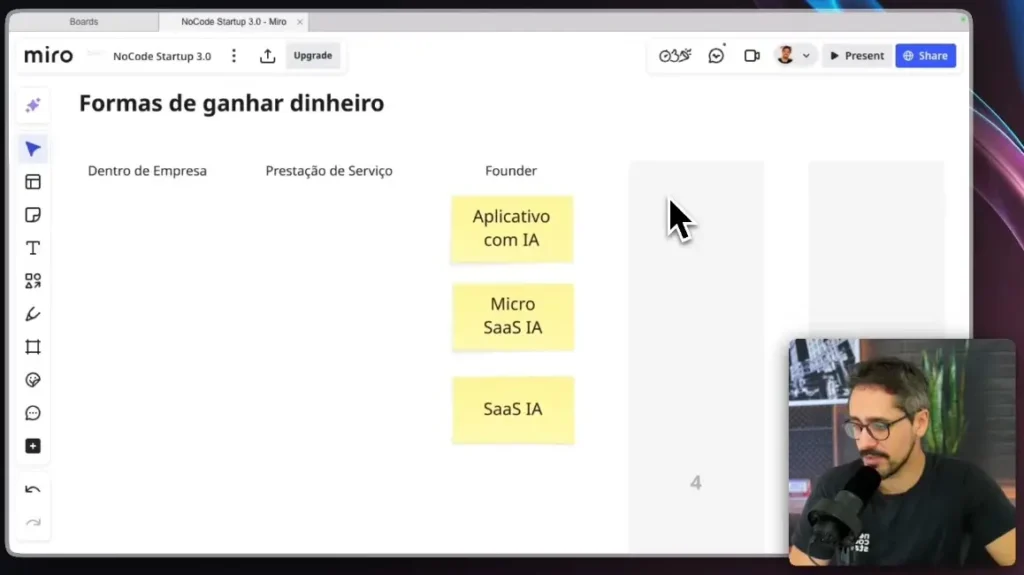
Founder: Creating AI-powered apps

Founder creating AI-powered apps

Creating AI-powered apps has never been more accessible.
Tools like Lovable, Cursor and integrations with Supabase They make this possible even without a technical background.

The financial potential is high, but so is the difficulty.
Creating technology is no longer the differentiating factor — today, the challenge lies in marketing, distribution, finance, and validation.

It's a path of great learning, but with a high error rate at the beginning.
It's worth it if you're willing to make mistakes, learn, and iterate.

Micro SaaS with AI (pros and cons)

Micro SaaS with AI (pros and cons)

O Micro SaaS It solves a specific problem for a specific niche.
This reduces competition and increases the clarity of the offer.

It doesn't scale like a traditional SaaS, but it can generate a consistent and sustainable income.
The challenge remains the same: marketing, sales, and management.

It's not easy, it's not quick, but it can be a great side business.
Here, I classify it as an "okay" path, as long as you have patience.

Traditional SaaS with AI

Traditional SaaS with AI

O SaaS traditional It has greater potential for scaling, but also greater competition.
You solve broader problems and compete in larger markets.

This requires more time, more emotional capital, and greater execution capacity.
Therefore, the Micro SaaS often ends up being a smarter choice at the beginning.

SaaS is powerful, but it's definitely not the easiest path.

AI-powered education: courses and digital products

AI-powered education courses and digital products

AI-powered education is extremely scalable.
Once the product is ready, delivery is almost automatic.

The problem is time.
Building an audience, producing content, and establishing authority takes months—sometimes years.

Here in NoCode Startup, It took us quite a while for the project to become truly financially relevant.
It works, but it requires consistency and a long-term vision.

AI Communities

AI Communities

Communities generate networking, repeat business, and authority.
But they also require constant presence, events, support, and a lot of energy.

It's a powerful, yet laborious model.
I don't recommend it as a first step for those who are just starting out.

With experience and an audience, it can become an incredible asset.

Templates, ebooks, and simple products powered by AI.

Templates, ebooks, and simple products with AI.

Templates and ebooks are easy to create and scale.
That's precisely why competition is fierce and perceived value tends to be low.

Today, if something can be solved with a question in ChatGPT, It's difficult to sell only information.
These products work best as a complement, not as a main business.

To make real money with AI, deliver execution and result That's what makes the difference.

Next step

Next step

There's no such thing as easy money with AI.
What exists is More access, more tools, and more possibilities. for those who perform well.

The most solid paths involve providing services, well-positioned products, and building authority.
The easier something seems, the greater the competition tends to be.

If you want to learn AI in a practical, structured way, focused on real-world projects, check out... AI Coding Training.

Technology is undergoing a historic transition: from passive softwares to autonomous systems. Understanding the types of AI agents It's about discovering tools capable of perceiving, reasoning, and acting independently to achieve complex goals, without the need for micromanagement.

This evolution has transformed the market. For professionals who want to lead the AI infrastructure, Mastering the taxonomy of these agents is no longer optional.

It's the exact competitive differentiator between launching a basic chatbot or orchestrating a complete digital workforce.

In this definitive guide, we'll dissect the anatomy of agents, exploring everything from classic classifications to modern LLM-based architectures that are revolutionizing the No-Code and High-Code worlds.

Diagram illustrating the perception, reasoning, and action loop of different types of AI agents in a digital environment.

What exactly defines an AI agent?

Before we explore the types, it's crucial to draw a clear line in the sand. An artificial intelligence agent is not merely a language model or a machine learning algorithm.

The most rigorous definition, accepted both in academia and industry, as in the course Stanford CS221, describes an agent as a computational entity situated in an environment, capable of perceiving it through sensors and acting upon it through actuators to maximize its chances of success.

The Crucial Difference: AI Model vs. AI Agent

Many beginners confuse the engine with the car.

  • AI model (ex: GPT-4, Llama 3): It's the passive brain. If you don't send a prompt, it does nothing. It has knowledge, but no agency.
  • AI Agent: It's the complete system. It has the model as its core reasoning tool, but it also has memory, access to tools (databases, APIs, browsers), and, crucially, a goal.

An agent uses the model's predictions to make sequential decisions, manage states, and correct the course of its actions.

It's the difference between asking ChatGPT "how to send an email" (Template) and having a software that autonomously writes, schedules, and sends the email to your contact list (Agent).

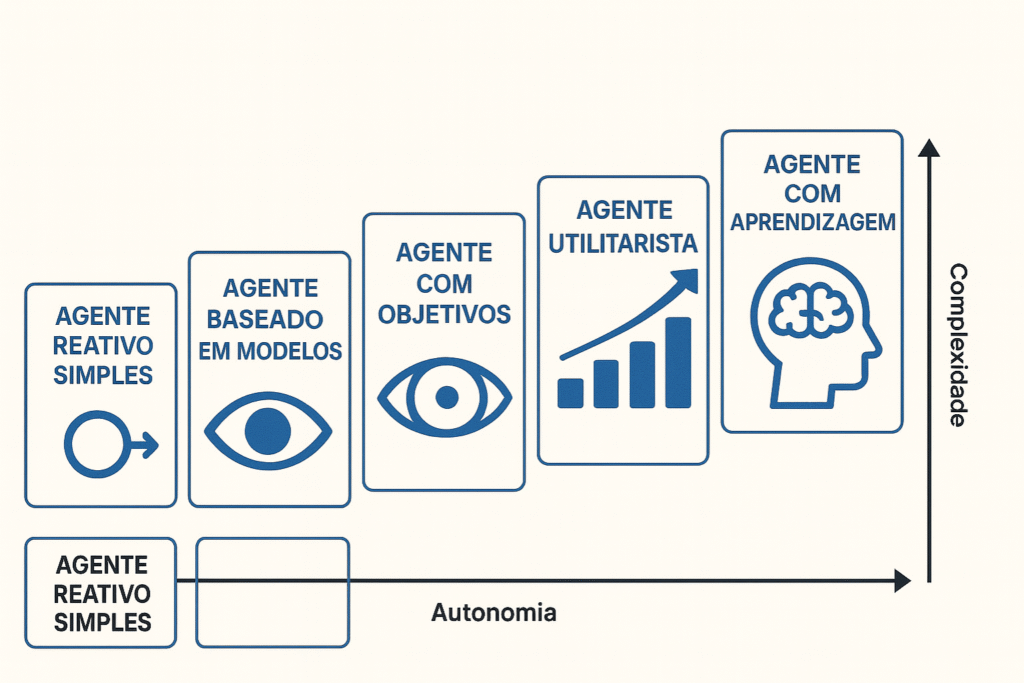
The 5 Classic Types of AI Agents

To build robust solutions, we need to revisit the theoretical foundation established by Stuart Russell and Peter Norvig, the fathers of modern AI.

The complexity of an agent is determined by its ability to handle uncertainties and maintain internal states.

Here are the 5 types of AI agents hierarchical structures that form the basis of any intelligent automation:

1. Simple Reactive Agents

This is the most basic level of intelligence. Simple reactive agents operate on the "if-then" principle.

They only respond to the current input, completely ignoring history or past states.

  • How it works: If the sensor detects "X", the actuator does "Y".
  • Example: A smart thermostat or a basic spam filter. If the temperature exceeds 25ºC, it turns on the air conditioning.
  • Limitation: They fail in complex environments where the decision depends on a historical context.

2. Model-Based Reactive Agents

Taking it a step further, these agents maintain an internal state — a kind of short-term memory.

They don't just look at the "now," but consider how the world evolves independently of their actions.

This is vital for tasks where the environment is not fully observable. For example, in a self-driving car, the agent needs to remember that there was a pedestrian on the sidewalk 2 seconds ago, even if a truck momentarily blocked its view.

3. Goal-Based Agents

True intelligence begins here. Goal-oriented agents don't just react; they plan.

They have a clear description of a "desirable" state (the goal) and evaluate different sequences of actions to achieve it.

This introduces search and planning capabilities. If the goal is to "optimize the database," the agent can simulate various paths before executing the final command, something essential for those working with... AI for data analysis.

4. Utility-Based Agents

Often, achieving the goal is not enough; it is necessary to achieve it in the best possible way. Utility-based agents use a utility function (score) to measure preference between different states.

If a logistics agent aims to deliver a package, the utility agent will calculate not only the route that gets there, but the fastest route, using the least amount of fuel and with the greatest safety. It's about maximizing efficiency.

5. Agents with Learning

At the top of the classic hierarchy are the agents capable of evolving. They have a learning component that analyzes feedback from their past actions to improve their future performance.

They start with basic knowledge and, through exploration of the environment, adjust their own decision rules. This is the principle behind advanced recommendation systems and adaptive robotics.

Infographic comparing the complexity and autonomy of five classic AI agent types, from simple reactive to learning agents.

What are generative agents based on LLMs? 

Classical taxonomy has evolved. With the arrival of the Big Language Models (LLMs), a new category has emerged that dominates current discussions: Generative Agents.

In these systems, the LLM acts as the central controller or "brain," using its vast knowledge base to reason about problems that were not explicitly programmed, as detailed in the seminal paper on... Generative Agents.

Reasoning Frameworks: ReAct and CoT

For an LLM to function as an effective agent, we utilize techniques of prompt engineering advanced principles that structure the model's thinking:

  1. Chain-of-Thought (CoT): The agent is instructed to break down complex problems into intermediate steps of logical reasoning ("Let's think step by step"). Research indicates that this technique... It stimulates complex reasoning. in large models.

  2. ReAct (Reason + Act): This is the most popular architecture currently. The agent generates a thought (Reason), executes an action on an external tool (Act), and observes the result (Observation). This loop, described in the paper... ReAct: Synergizing Reasoning and Acting, This allows it to interact with APIs, read documentation, or execute Python code in real time.

Tools like AutoGPT and BabyAGI They popularized the concept of autonomous agents that create their own task lists based on these frameworks.

You can explore the original code of AutoGPT on GitHub or from BabyAGI to understand the implementation.

Tip in Specialist: For those who wish to delve deeper into the technical design of these systems, our AI Coding Training It explores exactly how to orchestrate these frameworks to create intelligent softwares.

Architectures: Single Agent vs. Multi-Agent Systems

When developing a solution for your company, you will face a critical architectural choice: should you use a super agent that does everything or multiple specialists?

What is the difference between Single Agent and Multi-Agent Systems?

The difference lies in form of organization of intelligence.
One Single Agent It concentrates all the logic and execution into a single entity, making it simpler, faster, and easier to maintain, ideal for straightforward tasks with a well-defined scope.

Already the Multi-Agent Systems They distribute the work among specialized agents, each responsible for a specific function.

This approach increases the ability to solve complex problems, improves the quality of results, and facilitates the scalability of the solution.

When should you use a Single Agent?

A single agent is ideal for linear, narrow-scope tasks. If the goal is "summarize this PDF and send it by email," a single agent with the right tools is efficient and easy to maintain.

Latency is lower and development complexity is reduced.

The Power of Multi-Agent Orchestration

For complex problems, the industry is migrating to Multi-Agent Systems (MAS). Imagine a digital agency: you don't want the copywriter to do the design and approve the budget.

Recent technical discussions, such as this one Single vs Multi-Agent debate, They show that specialization trumps generalization.

In a multi-agent architecture, you create:

  • A "Researcher" agent that searches for data on the web.
  • An "Analyst" agent that processes the data.
  • An agent called "Writer" who creates the final report.
  • A "Critical" agent who reviews the work before delivery.

This specialization mimics human organizational structures and tends to produce higher quality results.

Modern frameworks facilitate this orchestration, such as LangGraph for complex flow control, the CrewAI for teams of role-based agents, and even lighter libraries such as Hugging Face smolagents.

Visual representation of a multi-agent system where specialized agents collaborate to solve a complex business problem.

Practical Applications and No-Code Tools

The theory is fascinating, but how does this translate into real value? Different types of AI agents are already operating behind the scenes of large, agile startups operations.

Coding and Development Agents

Autonomous agents such as Devin or open-source implementations such as OpenDevin They utilize planning architectures and tools to write, debug, and deploy entire codebases.

In the No-Code environment, tools such as FlutterFlow and Bubble They are integrating agents that assist in building complex interfaces and logic using only text commands.

Data Analytics Agents

Instead of relying on analysts to generate manual SQL reports, utility- and goal-oriented agents can connect to your data warehouse, formulate queries, analyze trends, and generate proactive insights.

This democratizes access to high-level data.

Solutions for Businesses

For the corporate sector, the implementation of AI-powered automation solutions It focuses on operational efficiency.

Customer service agents (Customer ExperienceAgents who not only answer questions but also access the CRM to process reimbursements or change plans are examples of goal-oriented agents that generate immediate ROI.

Companies like Zapier and the Salesforce They already offer dedicated platforms for creating these corporate assistants.

Interface of a business dashboard displaying performance metrics optimized by autonomous AI agents.

Frequently Asked Questions about AI Agents

Here are the most common questions we receive from the community, which dominate searches on Google and in forums like... Reddit:

What is the difference between a chatbot and an AI agent?

A traditional chatbot typically follows a rigid script or simply responds based on trained text.

An AI agent has autonomy: it can use tools (such as a calculator, calendar, email) to perform real-world tasks, not just converse.

What are autonomous agents?

These are systems that can operate without constant human intervention. You define a broad objective (e.g., "Discover the 5 best SEO tools and create a comparison table"), and the autonomous agent decides which websites to visit, what data to extract, and how to format the results on its own.

Do I need to know how to program to create an AI Agent?

Not necessarily. While knowledge of logic is vital, modern platforms and No-Code frameworks allow the creation of powerful agents through visual interfaces and natural language.

For advanced customizations, however, understanding the logic of AI Coding That's a huge advantage.

Futuristic concept of human-AI collaboration, where developers orchestrate multiple types of AI agents in a digital work environment.

The Future is Agentic — And It Requires Architects, Not Just Users

Understanding the types of agents AI It's the first step in moving from being a consumer of technology to being a creator of solutions.

Whether it's a simple reactive agent for email triage or a complex multi-agent system for managing e-commerce operations, digital autonomy is the new frontier of productivity.

The market is no longer just looking for those who know how to use ChatGPT, but those who know... designing workflows that ChatGPT (and other models) will execute.

If you want to move beyond theory and master building these tools, the ideal next step is to learn about our... AI Agent Manager Training. The era of agents has only just begun — and you could be in charge of it.

If you are looking to create more advanced projects, with better security, greater scalability, and more professionalism using the tools of Vibe Coding, This guide is for you.

In this article, I've outlined three very important tips that will guide you from beginner to advanced and truly professional projects.

We need to go beyond a simple visual interface and build a solid architecture. Let's go!

Why combine Lovable, N8N, and Supabase?

Tip 1: Starting by focusing on the main pain point

best ai app builder vibe coding platform​

My first piece of advice is to start with Lovable, but focus on simpler, more direct projects, addressing the pain points you want to solve with technology.

Be a SaaS, one Micro SaaS Whether it's an app or an application, find out what the main pain point is for your end user.

It's crucial to avoid the mistake of including "a million features, a million metrics," and complex business rules right from the start. This confuses the user and will almost certainly cause the project to fail.

Focus on creating in Lovable He creates very beautiful and visually appealing apps interfaces. Solve the main pain point first, and only then can you make the project more complex.

Case

best vibe coding apps​ (2)

A very interesting example, and one of Lovable's main case studies, is... Plink.

Basically, it's a platform where women can check if their boyfriend has had any run-ins with the police or has a history of aggression.

The creator, Sabrina, became famous because she created the app without knowing any code, focused on the main pain point, and the app simply "exploded.".

In just two months, the project was already projecting $2.2 million in revenue. She validated the idea on Lovable, proving that market focus is what makes a project successful.

Another example is an AI agent management application. We always start with the interface in Lovable and only then migrate the project to [the other platform/tool]. Cursor to make it more advanced and complex.

Master Supabase, the heart of advanced projects.

top ai app builder with vibe coding​

The second tip, and the most important for security and scalability, is to thoroughly learn the Supabase component. This encompasses data modeling and all back-end functions.

To create AI projects, you'll need the front-end (the user interface, like in Lovable) and the back-end (the intelligence, data, security, and scalability).

The back-end uses the N8N for automation and AI agents, but it is the Supabase which will be the heart of your project.

If you want a highly secure and scalable project, the secret is to master Supabase.

Courses for Beginners:

The great advantage is that, if the interface created by Lovable has a problem, since you already have the core of your project well structured, you can simply remove Lovable and plug the data into another interface, such as Cursor.

You don't need to be a technician, but you need to understand the... MacroHow data modeling, security (RLS), and data connection work.

Understanding these basics is crucial for you to be able to request and manage AI effectively. For this, I recommend our course. Supabase Course in the PRO subscription.

Tip 3: When to move on to Cursor/AI-powered code editors

best vibe coding apps

The third tip is about taking the next step: migrating to AI-powered code tools and editors, such as... Cursor or Cloud Code.

It's very important to start with Lovable in a simplified way, but if you want to make your project more advanced, robust, and scalable, you'll need to combine the organization of your back-end in Supabase with the greater control offered by these tools.

However, it is essential to understand that knowing well the Supabase It's a prerequisite before jumping into the... Cursor, Because you need to have the database and architecture very well organized.

For complex projects, this union is key to having complete control over the code and structure.

Get to know the AI Coding TrainingMaster prompt creation, build advanced agents, and launch complete applications in record time.

en_USEN
menu arrow

Nocodeflix

menu arrow

Community