


The advancement of artificial intelligence isn't limited to creating texts, images, or code. In 2025, OpenAI took an unprecedented step with the launch of... OpenAI Operator, a computational agent with the capability to autonomous web browsing and direct interaction with graphical user interfaces (GUIs).
This means that ChatGPT can literally control a browser like a human would.
The relevance of this feature goes far beyond technological curiosity: it inaugurates a new era in the automation of online tasks and opens up unprecedented possibilities in productivity, data analysis, and interaction with systems without APIs.

What is OpenAI Operator?
O OpenAI Operator It is a ChatGPT feature that allows the model to act as a Computer-Using Agent (CUA), that is, an agent capable of Use a real browser to perform tasks. autonomously.
It is part of the "Pro" mode and works in conjunction with the Agent Mode, where custom agents can be configured with specific tools, goals, and behaviors.
By activating Operator, the user enables an agent with access to a secure browser that can:
Clicking on buttons and links
OpenAI Operator can identify interactive elements on a page, such as buttons and hyperlinks, and perform clicks with precision.
This is essential for navigating between stages of an online process or activating specific functionalities on web platforms.
Fill out and submit forms.
One of Operator's most useful features is its ability to populate form fields with contextual data and submit it automatically.
This allows for automations such as user registration, sending requests, or filling in administrative data.
Copy and paste information between tabs.
Operator is also capable of managing multiple tabs simultaneously, copying data from one page and pasting it onto another.
This capability makes it ideal for tasks such as consolidating data from different sources or migrating information between systems.
Perform searches on websites
In addition to browsing, Operator can understand search commands and apply filters within complex pages, even simulating typing in search fields.
This makes tasks like locating products, information, or documents in unstructured systems easier.
Extracting data from tables or specific elements.
Using computer vision and semantic recognition, Operator can identify structures such as tables, lists, or cards and extract data with precision.
This feature is crucial for creating automated reports, populating spreadsheets, or consolidating business data.
Unlike agents based solely on APIs, the Operator interacts with the interface as a human would, using computer vision and real-time decision-making models.
How to activate Operator in ChatGPT
To use Open AI Operator, you need to be on the plan. ChatGPT Plus (Pro) and activate the navigation mode with Operator. The process is simple:
- Access the ChatGPT settings;
- Enable the option “Enable browser automation with Operator”;
- Within a custom agent (Agent Mode), include the "Browser Automation" tool;
- ChatGPT will show that the Operator is active with a visual notification.
This feature is being rolled out gradually, but many users with an active plan can already access it.
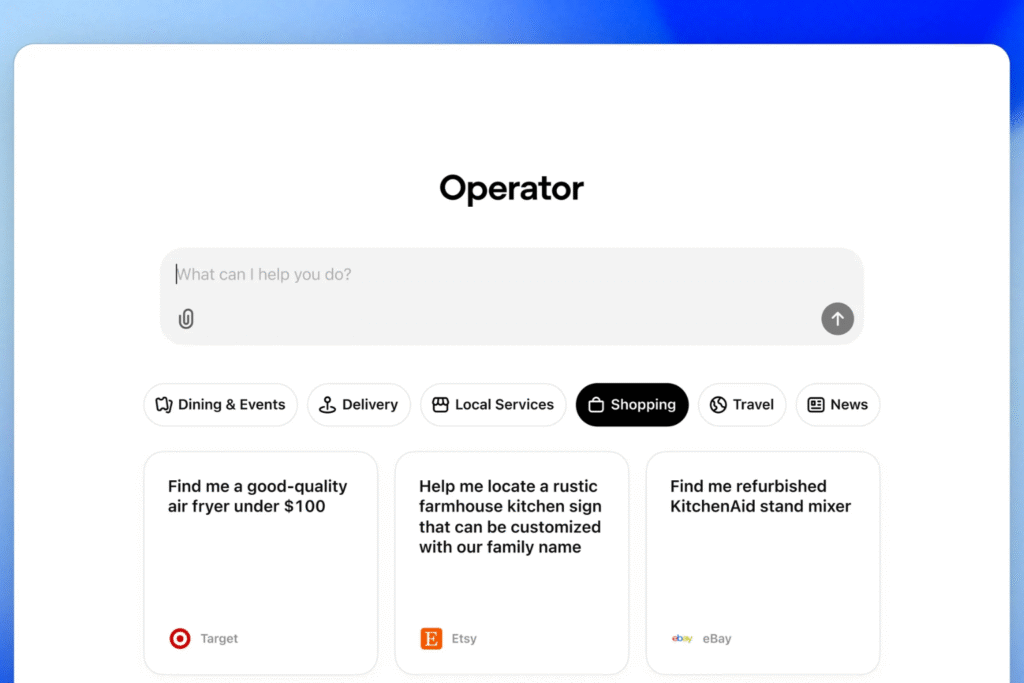
What can Operator actually do in practice?
The main advantage of OpenAI Operator is its ability to Automate repetitive or complex tasks directly in the website interface.. This includes:
- Monitor price trends in e-commerces and generate reports;
- Filling out Google Sheets spreadsheets by copying data from other sources;
- Book appointments for online services;
- Managing systems that do not have an API, such as legacy ERPs;
- Log in to accounts and verify information automatically.
These actions are possible thanks to the combination of computer vision, natural language understanding, and navigation rules.
Operator simulates a human using the browser, but with superior speed and accuracy.
Is it safe to use OpenAI Operator for sensitive tasks?
THE security and privacy Operator security is one of OpenAI's main concerns. Therefore, the agent does not perform any sensitive actions (such as making purchases or sending passwords) without explicit user permission.
Furthermore, the entire interaction history is recorded and auditable. The Operator operates within a controlled environment, with domain limits, session timeouts, and... context isolation between tasks.
For businesses, there is the possibility of customizing the Operator's action limits and monitoring its activity via Google Analytics 4, with agent traffic detection (CUAs) based on customized headers and behavioral fingerprinting.

Current limitations of the Operator
Despite its advanced features, OpenAI Operator still has important limitations:
Operator still faces challenges in handling highly dynamic interfaces, such as single-page applications (SPAs), where elements are constantly changing and making precise identification difficult.
There are also limitations in reading custom elements that don't conform to HTML standards. Highly customized components can hinder the agent's recognition and proper interaction.
Another point of concern is the security systems. Operator does not handle captchas or multi-factor authentication well, as these require human intervention and interrupt the automated flow.
These limitations are being continuously adjusted with weekly updates. To keep up with the evolution of the technology, visit the [link/website/etc.]. official OpenAI documentation and technical articles such as this paper about browser-based agents.
Open AI Operator vs Open Operator (open-source)
A relevant comparison for developers and companies is between OpenAI Operator it's the Open Operator, an open-source project maintained by the community. Browserbase.
While OpenAI's Operator integrates natively with ChatGPT, offering enterprise-grade security and support, Open Operator is geared towards developers who want complete control over the agent.
It can be hosted locally and allows you to define custom scripts with Node.js and Puppeteer.
Both play an important role in the emerging web agentic, However, they have distinct audiences: one focuses on accessibility and integration, the other on flexibility and control.
Applicability and future of autonomous navigation agents.
OpenAI Operator is just the tip of the iceberg of a broader trend: intelligent automation based on human behavior.
With the evolution of multimodal models and the incorporation of sensors and contextual memory, we will see agents capable of:
Operation with multiple tabs and parallel flows
Operator can control different browser tabs simultaneously, allowing for parallel workflow execution.
This makes it ideal for tasks such as order management across multiple platforms or simultaneous comparison of market data. A real-world example is its use in e-commerces competitor analysis automation.
Integration between websites and legacy systems.
Even systems that don't have APIs can be integrated efficiently. Operator can extract data from a web system and insert it into internal databases or ERPs.
This feature has been tested by operations teams to update legacy CRMs with information gathered from social networks or marketplaces.
Mobile navigation testing and simulation
Operator can also simulate navigation on mobile devices, making it useful for UX and QA teams.
For example, in experiments with automated responsive interface testing, It was used to detect glitches in page display on mobile phones, without the need for external emulators.
Second OpenAI, Operator is already being tested in customer service, sales automation, and competitor analysis scenarios.
Meanwhile, companies like Opera are launching AI-native browsers, such as... Neon, This reinforces the trend towards an agent-driven web.
In practice, professionals in business, marketing, automation, and development will need to learn how to... Designing optimized tasks and workflows for agents..
And tools like OpenAI's Operator will be the new "operating system" for online interaction.

Exploring Open AI Operator as a strategic tool
For those who wish to begin exploring the potential of Operator, the following is recommended:
- Follow the updated tutorials on OpenAI official page;
- Test simple scenarios such as logging into websites, extracting prices, or submitting forms;
- Monitor interactions with tracking tools like GA4 (see this guide on...) How to track OpenAI Operator in Google Analytics);
- Compare the performance with traditional RPA scripts or extensions like UI.Vision;
- Evaluate whether Operator can replace API integrations in legacy systems.
For No Code Start Up users, Operator opens doors to new SaaS product models, customer service automation, and rapid idea validation with the power of AI + browser.
This is not just a new feature: Open AI Operator redefines the role of artificial intelligence on the web.
Want to master using AI agents and browser-based automation? Discover the complete course from No Code Start Up.
Recommended Links:
















 EN
EN  PT
PT  ES
ES 