

The statistic is impressive: more than 800.000+ Creators are already using Softr to launch internal portals and tools, often in less than 24 hours, without needing to write any code.
But Softr in 2025 is no longer just The tool for "websites on top of Airtable". Now, it's a platform. full-stack. You can connect it to Google Sheets for a quick MVP, or use powerful backends such as... Supabase and Xano to scale without limits on registrations.
With the new “Database AI Agents” and the “AI App Generator”, Softr has become the fastest bridge between an idea and a functional business application.
Follow 8 steps to define goals, validate the market, build an MVP in Softr and publish today.
Contents
What is Softr (and what is it NOT)?
Softr is the fastest No-Code platform for creating front-ends Responsive web interfaces. He specializes in "customer portals" and "internal tools," where users need to log in to view and manipulate data.
How it works (The 3-step logic):
- Connect your Base: You choose where your data lives. It can be a spreadsheet (Google Sheets), a no-code database (Airtable), or a scalable back-end (Supabase, Xano, Softr Databases).
- Drag Blocks: In Softr's visual interface, you add pre-built "blocks" (such as lists, tables, charts, forms) and connect them to your database.
- Configure Permissions: This is Softr's superpower. You define who sees what, based on the user's login (e.g., "Clients can only see their own projects").
Example: A "Student Portal" where each student logs in, sees only the courses they have purchased, and can update their profile, which saves the information directly to Airtable or Supabase.
What it is NOT: Softr is not the ideal tool for native mobile apps (for that, use FlutterFlow) or for complex back-end automations (for that, use Make).
Softr is the shortest path between a database and a secure, functional web portal.
1. Define the scope
The first step isn't about the app; it's about the... problem. Before dragging a single block into Softr, you need to clearly define what your application solves and for whom.
How to do it (The Scope Checklist):
- What's the problem? Be specific. (Ex: “The support team spends 3 hours a day responding to emails about order status”).
- Who is the user? (Ex: “Customers who placed an order”).
- What is the main task (the "job")? (Ex: “The client needs see "The status of your order in real time.".
- What is the metric for success? (Ex: “Reduce support emails in 50%”).
Example:
- Problem: Customers send emails to view tutorials and account status.
- Solution (App): A customer portal (the app) where the user logs in and sees their account status and a list of tutorials (the main tasks).
- Result (Metric): Reduced support emails and increased customer satisfaction.
What you get: A clear scope that acts as a "filter." If a feature doesn't help the user complete the main task, it's left out of the MVP.
Courses and Training
2. Conduct market research and talk to potential users
With the scope defined (Step 1), you need to confirm if the "problem" you identified is a problem. real for other people. This step is crucial to avoid building something that nobody wants.
How to do it (Quick Validation): The goal is to validate the pain, not your idea of solution.
- Interview 5-10 potential users. (stakeholders, clients, internal team).
- Ask about their current frustration: “"How do you deal with [the problem] today? What irritates you most about this process?"”
- Ask about the solution to your dreams: “"If you had a magic wand, what would the ideal solution do for you?"”
- Validate your intention to pay: “"If I built something that did X, Y, and Z, would that be something you would pay for?"”
Example: You he thinks that the problem is "not having a customer portal". After research, you discover that... real pain The problem is "the delay in receiving order status updates via email." The portal is the solution, but the validated pain point is the anxiety caused by the lack of information.
3. View the Softr application in action
Now that you’ve gathered feedback and identified key features, it’s time to map out how your app will work.
Use quick list or flowchart → form → spreadsheet → dynamic page. Visual helps you remember fields.
Think about the user journey: “I’ll start by creating a form for users to submit information, which will automatically be transferred to a spreadsheet.
The spreadsheet data will then update users’ profile pages, accessible to certain groups.”
This step does not require technical experience, just an understanding of how the application should work. Softr's interface is intuitive and allows you to map processes visually.
Therefore, having a general plan before you start will make the construction process easier.
4. Create wireframes (optional)
This step is optional, and for Softr, our recommendation is: skip the static wireframes. Don't waste time designing the app in tools like Figma.
Softr is so fast that its "draft" is already the functional prototype.
How to do it (The Functional Prototype):
- Open Softr and choose a starting point template.
- Drag the pre-built blocks (table, list, form) that you mapped in Step 3.
- Connect your data source (even if it's just a sample spreadsheet with 5 rows).
- Click "Publish" and send the link to your test users.
Risk/limit: Design tools (Figma) are great for complex visuals. But for an MVP, they delay validation. A functional prototype in Softr tests the... function it's the data flow In real time, which is much more valuable.
This approach is particularly effective if the project requires stakeholder approval or extensive testing.
5. Choose Softr as your NoCode tool
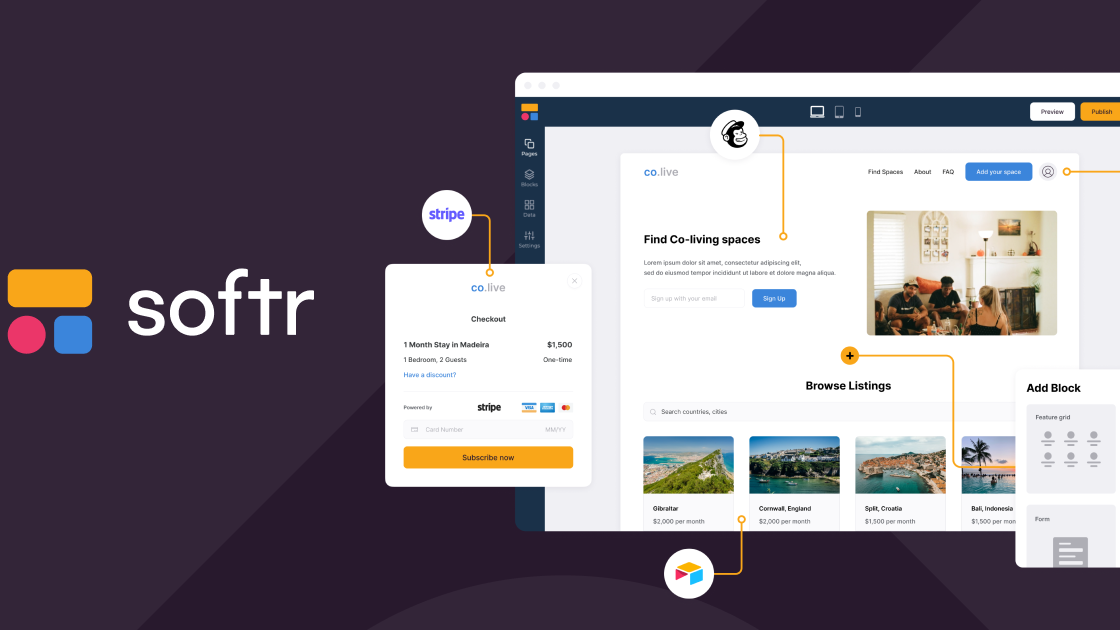
Choose the NoCode tool Getting it right is a crucial step. For web applications, Softr is one of the most powerful platforms, combining ease of use with robust functionality.
So with Softr, you can create web applications that look professional without sacrificing flexibility or customization.
Why Softr stands out (2025 Criteria):
- Multiple Back-ends: This is the number one differentiator. You can start with Google Sheets (fast and free), use Airtable (visual), or scale to robust back-ends like... Supabase and Xano without needing to change the front-end.
- Granular Permits: Softr excels at "user groups." It makes it easy to create visibility rules (e.g., "Clients only see their own data," "Managers see everything").
- Security and Authentication: It offers secure login (SSO, Google Sign-in, Magic Links) and data encryption, which is essential for business apps.
- AI Features (New): In 2025, Softr will include an “AI App Generator” (to create the app from a prompt) and “Database AI Agents” (to run AI on your data, such as summarizing or tagging).
You choose Softr because of its ability to climb. You start simple with Google Sheets and grow to an enterprise-level back-end, all on the same platform.
6. Create a Minimum Viable Product (MVP) and get feedback
It's time to build. The MVP objective It's not about being beautiful, it's about being... functional. You should focus on making the data flow (Step 3) work as quickly and simply as possible, using your data source.
How to (Building the MVP in 1 Hour):
- Use the AI App Generator: In 2025, the fastest way is to describe your app to Softr's AI, which generates the basic building blocks. (Or, choose a "Customer Portal" template).
- Connect your Data Source: Connect the Google Sheets or Airtable document you prepared.
- Configure the Blocks: Add the essential blocks: a "Form" (for data entry), a "List" or "Table" (to display the data), and the "Login" block.
- Map the Fields: “"Link" the fields in your spreadsheet to the fields in the blocks. (Ex: The "Name" field in your table is linked to the "Name" field in Softr).
- Publish and Test: Click “Publish”. Send the link to the 5-10 users you interviewed in Step 2 and ask them use (and try to break) the flow.
Example: You build a portal that has a login page and a page with a "List" of the client's projects. You ask your test user: "Can you log in and see your project?"“
What you get: A published and functional link. The feedback you receive here will be about the data flow (e.g., "the form did not save"), which is much more valuable than feedback on colors.
7. Customize your app with the Softr
Customization in Softr isn't about "colors." It's about... permissions and logic. This is where your app stops being a "website" and becomes a smart "portal".
This is the step where you define who sees what and who can do what.
How to do it (The 3 Layers of Customization):
- Visual Identity: Yes, now you adjust the basics: your logo, fonts, and brand colors.
- Permissions (The Essentials): Go to the “Users” section and create “User Groups” (e.g., “Clients”, “Admins”, “Team”).
- Block Visibility: In each block From your page, define who can see it. (Ex: The "Billing Dashboard" is only visible to the "Admins" group).
- Data Permissions: In your "List" or "Table", configure the permission "Logged-in users can view". only their own records“".
Example: Two customers (A and B) log into your app. Customer A sees just his projects. Client B sees just His projects. You, as Admin, see them all. That's the magic of Softr.
Additionally, Softr's flexibility allows for continuous improvements, so don't hesitate to make adjustments as you receive feedback from users.
8. Launch and test
With your custom app, you’re ready to launch! Before making it available to all users, do one last round of testing to make sure everything works as expected.
How to do it (The Back-end “Upgrade”):
- Final Test: With the customized app (Step 7), perform a final end-to-end test. Have a "Client" (test) and an "Admin" (test) use the app simultaneously.
- Lance (Connect the Domain): In the Softr configuration, add your professional domain (e.g., “https://www.google.com/search?q=yourcompany.portal.com”).
- Scale (The Cat's Leap): Is your MVP on Google Sheets or Airtable validated and receiving many users? Are you experiencing slowdowns or hitting record limits?
- It's time to scale. At Softr, you can. to replace your data source, keeping the same front-end. Migrate your data to the Supabase or Xano and reconnect the blocks.
Risk/limit: Don't start with Supabase if you're a beginner. Softr shines because it allows you to... validate in Google Sheets (easy and free) and scale for the Supabase (robust) when it has traction.
Once you’re sure your app is ready, launch it and share it with your target audience. Softr offers hosting options, so you don’t have to worry about complicated setups.
Also, after launch, continue to monitor user feedback. Therefore, the advantage of using one of the best tools NoCode, as is the case with Softr, allows you to make quick adjustments based on real-time feedback. This enables continuous improvements without long development cycles.
Want to know more about the NoCode world? Come be a part of NoCodeIA Training and start your career!
Complementary Study:















 EN
EN  PT
PT  ES
ES 