

In this article, we will analyze and compare the best nocode backends available on the market to help you choose the most suitable option for your project.
We will take into account several factors, such as features, pricing, community, and market evolution.
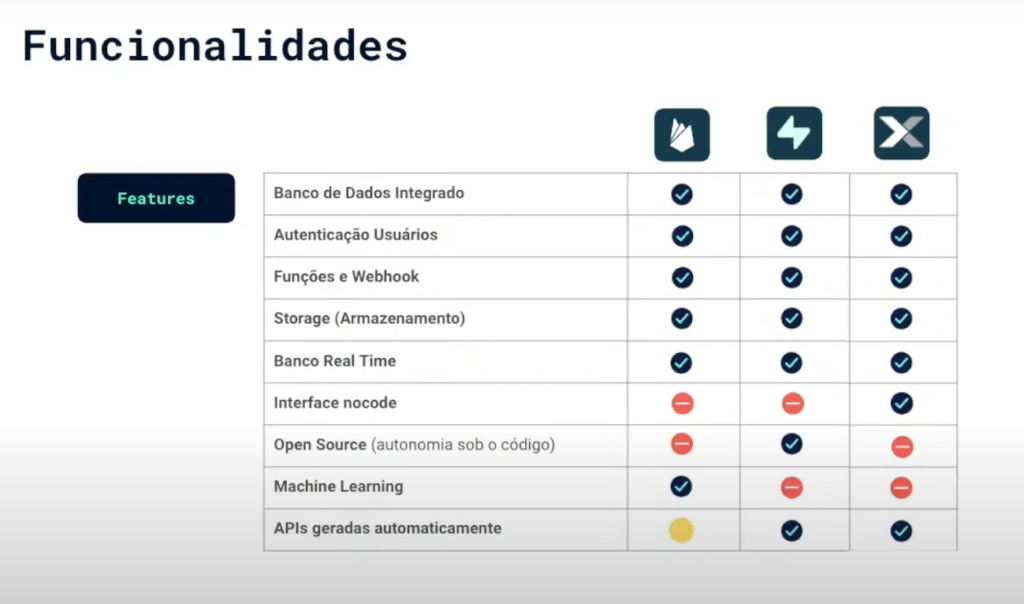
After extensive research, we selected three nocode backends to analyze in detail: Firebase, Supabase, and Xano.
Contents
Frontend VS Backend
Before we proceed, it's important to understand the difference between frontend and backend. The frontend is responsible for the visual part of an application, including the logic and the user experience (UX/UI). In the modern workflow... The front end consumes APIs. and auth/storage services (Direct connection to the DB is rare and undesirable).
The backend, on the other hand, is responsible for the database, authentication, media storage, server actions, and webhooks.
In short:
- FrontendEverything the user sees and interacts with (UI/UX, state, HTTP calls to APIs).
- BackendDatabase, authentication/authorization, APIs/functions (server/edge), storage and integrations (webhooks/queues).
No no-code/low-code, You orchestrate these services on platforms that already deliver ready-to-use API + Auth + Storage, such as Firebase, Supabase, and Xano.
Which one to choose in 10 seconds?
- FlutterFlow: Firebase (native integrations).
- Bubble: Xano (fast visual backend).
- WeWeb: Supabase (relational and cost/benefit).
Risks & quick limits
- Lock-in: Rules, data migration.
Plan limits/free tiers: Read/write on Firebase; tracks from Supabase; Starter from US$29/m on Xano — new in 2025.
firebase
Firebasand It's the most natural backend for FlutterFlow, Because the framework already includes native widgets and integrations.
The database is the Firestore (Document-oriented NoSQL), accompanied by Realtime Database in cases of simple synchronization.
- When to avoid: if you need complex joins or classic relational (e.g., ERP, BI), or there is a fear of lock-in (Firestore does not migrate easily).
- When to use: apps in FlutterFlow, fast MVPs, push notifications, auth via Google/Apple, apps mobile-first.
Plans (2025):
- Spark (free): 50K reads/day, 1GB storage.
- Blaze (pay as you go): pay per read/write/GB.
Tip: For rapidly growing apps systems, read costs can skyrocket.
Supabase
Supabase It's the right choice for those who need it. relational data (Complete Postgres). It's open-source, with managed hosting. It offers Auth ready, Automatic REST/GraphQL APIs, Realtime, Edge Functions, Storage CDN and even Vector DB for AI.
- When to use: SaaS multi-user, apps that need joins and reports, dashboards in WebWeb or Next.js.
- When to avoid: If you have minimal experience with SQL, or if you need something visually straightforward (Supabase requires handling queries).
Plans (2025):
- Free: 500MB DB + 1GB storage.
- Pro: US$ 25/month up to 8GB DB.
Enterprise: scalable, dedicated SLA.
Tip: Excellent cost/benefit ratio for up to 10-20K active users.
Xano
Xano delivers a backend 100% no-code, focused on creating custom APIs without needing SQL. It features a visual logic editor, ideal for non-developers who need it. flexibility.
- When to use: projects in Bubble or Adalo, MVPs that require complex business logic (e.g., calculations, workflows, advanced filters).
- When to avoid: if you need Complete relational SQL Or you want to avoid vendor lock-in (difficult migration).
Plans (2025):
- Starter: US$ 29/month (up to 5GB DB and 100K requests).
- Growth: US$ 99/month.
- Scale: Enterprise on demand.
Tip: Compared to Firebase, you gain more control over logic and fewer cost surprises.
Backend pricing
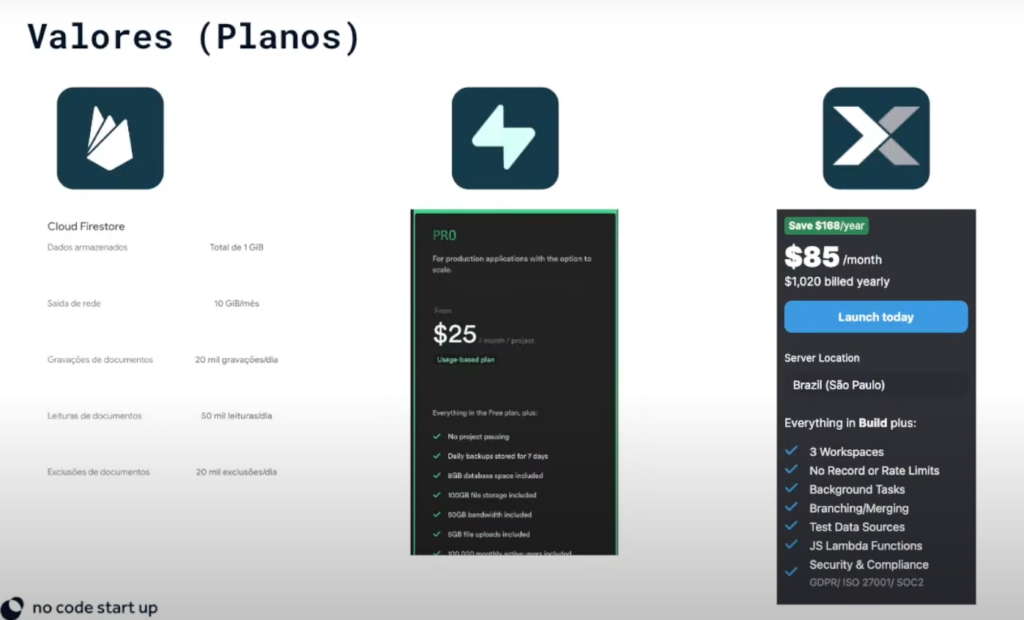
The prices of the tools vary according to usage and the features chosen. Firebase, for example, charges according to whether the database is read or edited.
Supabase offers a free plan and a Pro plan, with excellent value for money. Xano is a bit more expensive, but there are rumors that they will offer regional plans with more affordable prices for Brazil and other regions.
Comparative:
- firebase
- Free Tier: 50K reads/day + 1GB storage
- Initial Paid Plan: Pay as you go
- Cost Model: By reading/writing/storage
- Best For: Mobile apps in FlutterFlow
- Supabase
- Free Tier: 500MB DB + 1GB storage
- Initial Paid Plan: US$25/month (8GB)
- Cost Model: Fixed price (scalable)
- Best For: SaaS, relational dashboards
- Xano
- Free Tier: —
- Initial Paid Plan: US$29/month (5GB + 100K requests)
- Cost Model: Usage tiers
Best For: MVPs in Bubble/Adalo with complex logic
Main Differences between Nocode Backends
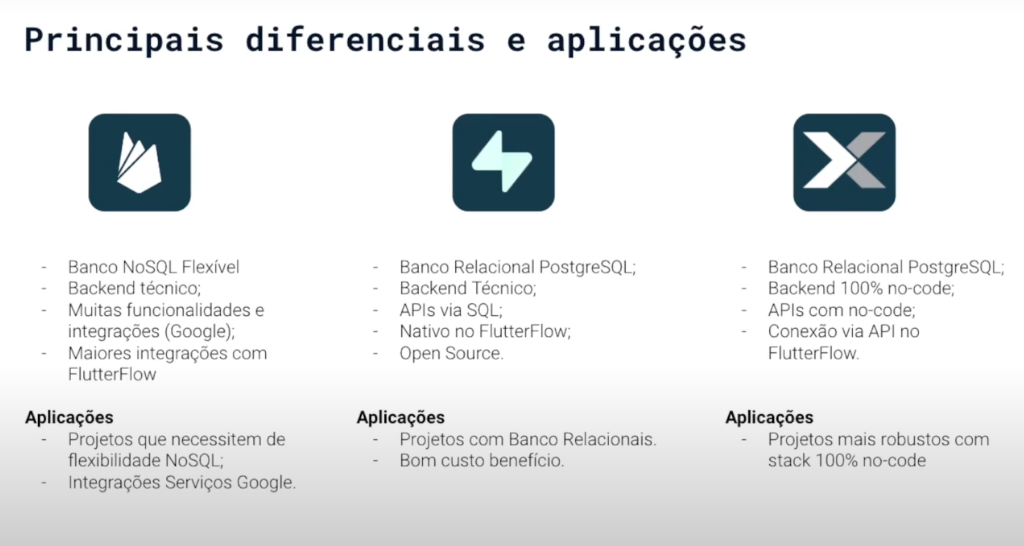
Each backend has its own unique features and ideal applications. Firebase is recommended for projects that require flexibility in non-relational databases and integrations with Google services.
Supabase is recommended for projects with relational databases that require ease of use and cost-effectiveness.
Finally, Xano is ideal for no-code projects, offering flexibility, ease of learning, and independence.
Decision matrix (use cases):
- Mobile app in FlutterFlow: Firebase (SDK and native integration)
- SaaS Multi-User (WeWeb, Next.js): Supabase (Relational + API ready)
- MVP in Bubble/Adalo: Xano (Quick visual backend)
- Project that requires complex joins: Supabase (Full SQL)
- Project that requires custom logic without SQL: Xano (Visual Logic Editor)
- Quick and inexpensive prototype: Firebase (Robust Free Tier)
Which no-code backend should I choose?
There is no universal "best".
- If you're using FlutterFlow, start with Firebase.
- If you need relational SQL and price predictability, go with Supabase.
- If you want to build visual logic without code in Bubble/Adalo, Xano is your ally.
The most important thing is to quickly test with your front-end and validate the cost in your scenario.
You have access to all nocode startup training courses in a single subscription and with the best available conditions
















 EN
EN  PT
PT  ES
ES 